
I lost a $38,000 kitchen remodel last year because my estimate took three days. The homeowner went with a contractor who quoted them the same afternoon. His price was higher than mine. Didn’t matter. He was first.
That was the moment I stopped pretending spreadsheets were good enough.
Quick Answer
Construction estimating software helps contractors build accurate, line-item bids faster than manual methods. The best options for residential remodelers include pre-built pricing databases, professional proposal output, and automated follow-up sequences that chase leads so you don’t have to. Most contractors recoup the subscription cost within their first two or three bids just from time saved and fewer missed line items.
Try EstimationPro free to see how AI-powered estimating cuts your quoting time from hours to minutes.
Why Spreadsheets Stop Working
Every contractor starts the same way. Yellow legal pad, maybe a calculator app on the phone. Then you graduate to Excel or Google Sheets. You build a template, add some formulas, and it works. For a while.
Here’s where it falls apart:
- Copy-paste errors. You duplicate last month’s bid, forget to update one cell, and your drywall takeoff is wrong by 200 square feet. I’ve done this. The profit on that job disappeared before we hung a single sheet.
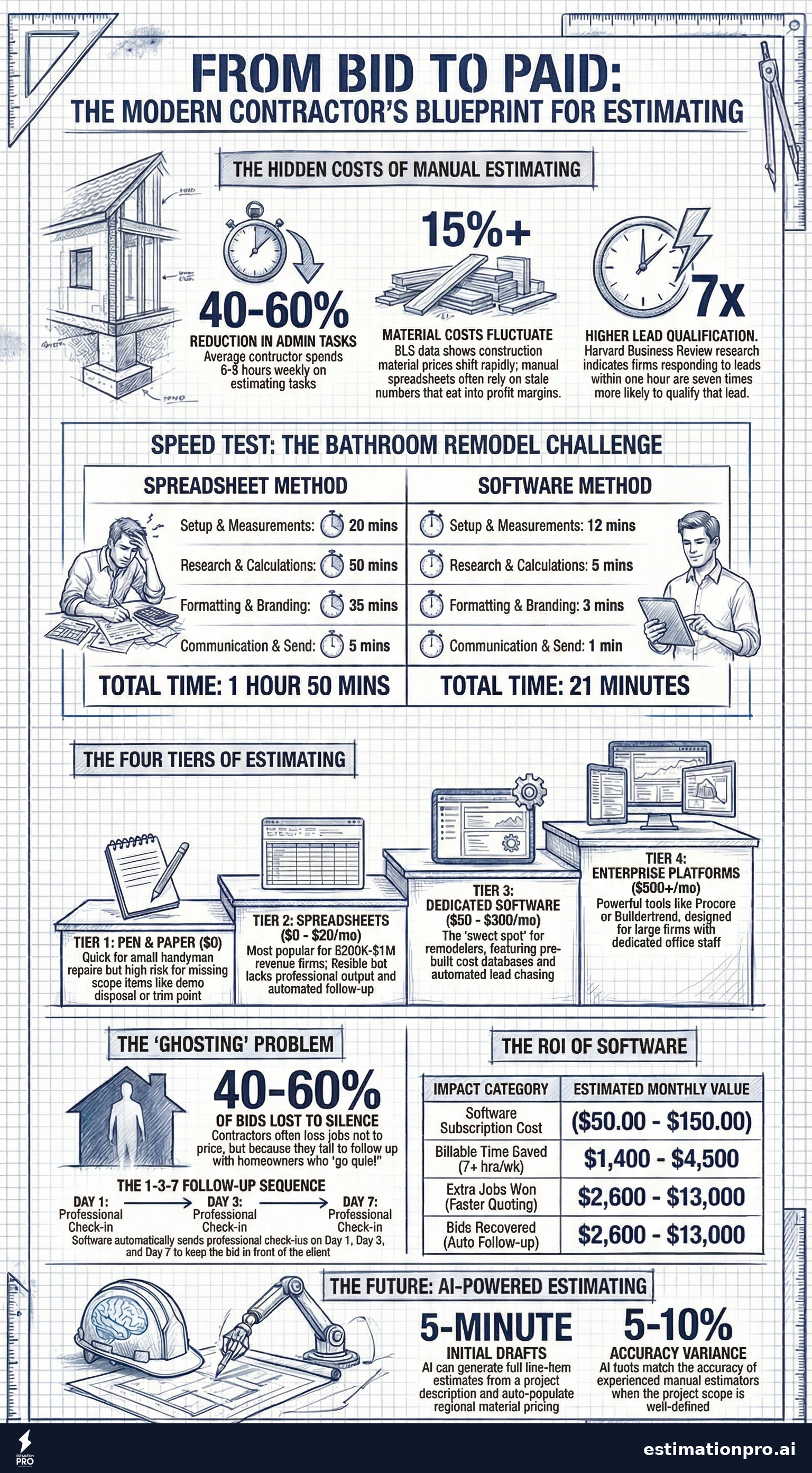
- No pricing updates. Your lumber costs are six months old. Material prices shifted 8-12% since your last update, and you’re bidding with stale numbers. According to the Bureau of Labor Statistics Producer Price Index, construction material costs have fluctuated more than 15% year-over-year in recent periods.
- Ugly output. You email a spreadsheet to a homeowner and it looks like a tax return. Compare that to a contractor who sends a branded, clean proposal with line items, scope descriptions, and terms. Who looks more professional?
- Zero follow-up. You send the bid and wait. The homeowner goes quiet. You mean to call them back but you’re on a jobsite all day. A week passes. They hired someone else.
Spreadsheets handle math. They don’t handle the business of winning work.
The Four Approaches to Estimating
Contractors generally fall into one of four camps. Here’s what each actually looks like in practice.
Pen and Paper
Still common on small handyman jobs. Quick for a single-trade repair where you know the price in your head. Falls apart the moment a job has more than three or four line items, because you’ll forget something. I’ve watched guys write bids on the tailgate of their truck and miss entire scope items - toilet supply lines, trim paint, demo disposal. The homeowner doesn’t catch it. You eat it.
Spreadsheets (Excel / Google Sheets)
The most popular approach for contractors doing $200K-$1M in annual revenue. Flexible. Familiar. Free. But spreadsheets don’t warn you when you forget a line item, and they don’t follow up with leads for you. According to the National Association of Home Builders (NAHB), the average contractor spends 6-8 hours per week on estimating and administrative tasks that software could reduce by 40-60%.
Dedicated Estimating Software
Purpose-built tools for contractors. These range from simple bid generators to full platforms that handle estimates, proposals, follow-up, invoicing, and payments. This is where most residential remodelers get the biggest return. The software pays for itself if it wins you even one extra job per quarter.
Use our Construction Cost Estimator for quick material and labor cost lookups as you evaluate your options.
Enterprise Platforms
Procore, Buildertrend, CoConstruct. Powerful, but designed for builders running $5M+ in revenue with office staff and project managers. If you’re a 2-5 person crew doing kitchen and bath remodels, you’ll spend more time configuring the software than using it. Overkill.
What to Look For in Estimating Software
Not all estimating tools solve the same problems. Here’s what actually matters for a residential remodeling contractor.
Speed. Can you build a bid in 15 minutes instead of 2 hours? If the software isn’t faster than your current method, it’s not worth the subscription.
Pricing accuracy. Does it include a cost database? How current is the data? Stale pricing is worse than no pricing, because it gives you false confidence. Material costs shift constantly. Your software should reflect that.
Professional output. The proposal your client receives is your first impression. A clean, branded document with line items, scope descriptions, payment terms, and your logo builds trust before you ever shake hands.
Follow-up automation. This is the one most contractors overlook, and it’s the one that makes the biggest difference. Research from the Harvard Business Review shows that firms responding to leads within one hour are seven times more likely to qualify that lead. Automated follow-up sequences (day 1, day 3, day 7) keep your bid in front of the homeowner without you lifting a finger.
Invoicing and payments. The best workflow is: estimate, proposal, follow-up, invoice, paid. All in one place. If you’re using one tool for estimates and another for invoicing, you’re wasting time stitching things together.
Check out the Construction Estimate Template for a free starting point if you’re not ready for full software yet.
Share This Infographic
Feel free to share this infographic on your website. Just copy the embed code below:
Copy this embed code:
<a href="https://estimationpro.ai/tools/blog/construction-estimating-software" target="_blank" rel="noopener">
  <img src="https://estimationpro.ai/tools/blog/infographics/construction-estimating-software-infographic.png" alt="construction estimating software infographic by EstimationPro.AI" style="max-width:100%;height:auto" loading="lazy" />
</a>
<p style="font-size:12px;color:#64748B;margin-top:8px">Source: <a href="https://estimationpro.ai/tools/blog/construction-estimating-software">EstimationPro.AI</a></p>
Worked Example: Quoting a Bathroom Remodel
Let’s compare the spreadsheet approach and the software approach on the same job - a standard bathroom remodel with tile shower, new vanity, and updated fixtures.
Spreadsheet Method
| Step | Time |
|---|---|
| Open last bathroom template | 5 min |
| Update measurements from site visit | 15 min |
| Research current tile pricing | 20 min |
| Research fixture costs | 15 min |
| Calculate labor hours | 20 min |
| Format for client | 25 min |
| Write email and send | 10 min |
| Total | 1 hr 50 min |
Margin for error: high. You’re pulling prices from three different sources and manually calculating labor based on production rates you keep in your head. Did you account for the waste factor on the tile? The short-load delivery fee for the cement board? The permit cost?
Software Method
| Step | Time |
|---|---|
| Select bathroom remodel template | 2 min |
| Adjust scope and measurements | 10 min |
| Review auto-populated pricing | 5 min |
| Customize proposal branding | 3 min |
| Send to homeowner | 1 min |
| Total | 21 min |
That’s 89 minutes saved on a single bid. If you bid 5 jobs a week, that’s over 7 hours back. Per week.
And here’s what matters even more than the time: the software-generated bid didn’t miss the tile waste factor. It didn’t forget the demo disposal. It included a payment schedule and terms. The homeowner received a professional document, not a spreadsheet screenshot.
The Follow-Up Problem Nobody Talks About
Here’s a number that should keep you up at night: contractors lose 40-60% of bids to ghosting. Not to a lower price. Not to a competitor with better reviews. To silence. The homeowner just never responds.
Most contractors don’t follow up. They’re busy. They’re on a jobsite at 7 AM and don’t get home until 6 PM. Calling back that lead from Tuesday? It slides. Then it’s been a week. Then it’s awkward.
Automated follow-up solves this without adding work. The software sends a polite check-in on day 1 after the bid goes out. A reminder on day 3. A final touch on day 7. Each message is professional, personalized, and automatic.
I’ve seen this single feature win back jobs that were dead. One homeowner told me they went with us specifically because “you were the only one who followed up.” We didn’t follow up. The software did. But the result was the same - a $27,000 bathroom remodel that would have gone to someone else.
Worked Example: What Estimating Software Costs vs. What It Earns
Let’s run the real math on whether the subscription makes sense.
| Item | Monthly |
|---|---|
| Software subscription (mid-tier) | $50 - $150 |
| Time saved (7+ hrs/week at $50-$150/hr GC rate) | $1,400 - $4,500 value |
| Extra jobs won from faster quoting (1-2/quarter) | $8,000 - $40,000 revenue |
| Bids recovered from follow-up (1-2/quarter) | $8,000 - $40,000 revenue |
General contractor billing rates typically run $50-$150 per hour depending on your market and trade, based on HomeGuide and BLS data for first-line construction supervisors.
Prices vary by region and reflect 2026 national averages. Your actual numbers will depend on your local labor market and the trades involved.
Even at the conservative end, the math isn’t close. A $100/month subscription that wins you one extra $15,000 job per quarter has a 50:1 return.
Mistakes Contractors Make When Choosing Software
Picking the most expensive option. Enterprise platforms look impressive in the demo. Then you realize you need 3 weeks of training and a full-time admin to run them. Match the tool to your operation size.
Ignoring the proposal and follow-up side. Estimating is only half the equation. If the software builds the bid but doesn’t help you win the bid, you’re solving the wrong problem.
Not migrating existing pricing. Whatever you switch to, bring your real numbers. Your field-tested production rates and material costs are more accurate than any generic database. Software should supplement your knowledge, not replace it.
Skipping the free trial. Never commit to annual billing on day one. Run 3-5 real bids through the trial. If it doesn’t feel faster by bid number three, move on.
The Contractor Markup Calculator can help you verify your margins are dialed in regardless of which estimating method you use.
How AI Changes the Game
The newest generation of estimating software uses AI to speed up the process even further. Instead of selecting line items from a database one by one, you describe the job - or upload photos and notes from the site visit - and the AI builds the estimate for you.
This isn’t science fiction. It’s working right now. AI-powered estimating can:
- Generate a full line-item estimate from a project description in under 5 minutes
- Auto-populate current material pricing with regional adjustments
- Flag missing scope items based on the project type
- Suggest appropriate markup based on job complexity
The contractor still reviews everything and makes adjustments. The AI handles the heavy lifting of building the first draft. Think of it like having a junior estimator on staff who works instantly and never forgets a line item.
Frequently Asked Questions
What is the best construction estimating software for small contractors?
For residential remodelers and small crews, the best option is a platform that combines estimating with proposals, follow-up, and invoicing in one tool. Standalone estimating apps miss the back half of the sales process where most jobs are actually won or lost.
How much does construction estimating software cost?
Most options for small contractors range from free (basic calculators and templates) to $50-$300 per month for full-featured platforms. Enterprise tools can run $500+ per month. The mid-range tier ($50-$150/month) typically offers the best value for remodeling contractors.
Can estimating software replace a professional estimator?
For residential remodeling work, yes. Software with a current pricing database and AI assistance can match or beat a junior estimator’s accuracy. For complex commercial or industrial projects, you’ll still want an experienced estimator reviewing the output.
Is AI estimating accurate?
AI estimating tools are trained on real pricing data and regional cost adjustments. Accuracy depends on the quality of the input and the underlying cost database. The best tools produce estimates within 5-10% of final costs when the scope is well-defined, which matches what an experienced contractor does manually.
Should I switch from spreadsheets to estimating software?
If you’re bidding more than 3-4 jobs per week, the time savings alone justify the switch. If you’re losing bids to slow response times or lack of follow-up, the switch is overdue. The real question isn’t whether to switch - it’s how much revenue you’re leaving on the table every month by not switching.
Stop Losing Bids to Slow Quotes
The contractor who quotes first usually wins. Not always, but often enough that speed matters more than most people think. Pair fast estimates with professional proposals and automated follow-up, and you’re not just bidding - you’re closing.
Contractors on Capterra rate EstimationPro 4.8/5 for time savings on residential estimates. EstimationPro doesn’t just build the estimate - it sends the proposal, follows up with the homeowner automatically, and handles invoicing and payments so you get from bid to paid without chasing paperwork. Try EstimationPro free and build your first estimate in under 10 minutes.
Estimating Methods Compared
- No learning curve
- No recurring costs
- Slow and error-prone
- No professional presentation
- No follow-up tracking
- Familiar interface
- Custom formulas
- Manual formatting required
- No client-facing output
- No follow-up automation
- Pre-built cost databases
- Professional proposals
- Client tracking
- Follow-up automation
- Invoicing and payments
- Full project management
- Multi-user collaboration
- API integrations
- Overkill for small crews
- Steep learning curve
Get Free Estimating Tips
Enter your email and we'll send you pro tips, cost data, and useful resources for contractors.
We'll send helpful resources and occasional tips. Unsubscribe anytime.
 EstimationPro AI For Contractors, By Contractors
 Create Detailed Estimates in Minutes, Not Hours
Upload photos, record voice notes, and get AI-powered estimates with line items, material lists, and regional pricing.