

I spent years doing estimates on a yellow legal pad, then graduated to Excel. Both methods had the same problem: I’d finish a bid at 9 PM, email it over, and never hear back. The homeowner went with whoever quoted first. Not whoever quoted best. Whoever showed up in their inbox while they were still excited about the project.
That’s the real reason contractor estimate pro software exists. Not because spreadsheets can’t add numbers. Because the speed gap between you and your competition is where you lose jobs.
Quick Answer
Contractor estimate pro software is a tool that helps contractors build detailed, line-item estimates, convert them into polished proposals, and follow up automatically so bids don’t die in the homeowner’s inbox. Good estimating software pays for itself within 1-2 months by helping you win even one additional job you would have otherwise lost to a faster competitor. Try EstimationPro free to see how it works on your next bid.
What Contractor Estimate Pro Software Actually Does
Forget the marketing fluff. Here’s what the software handles in your daily workflow:
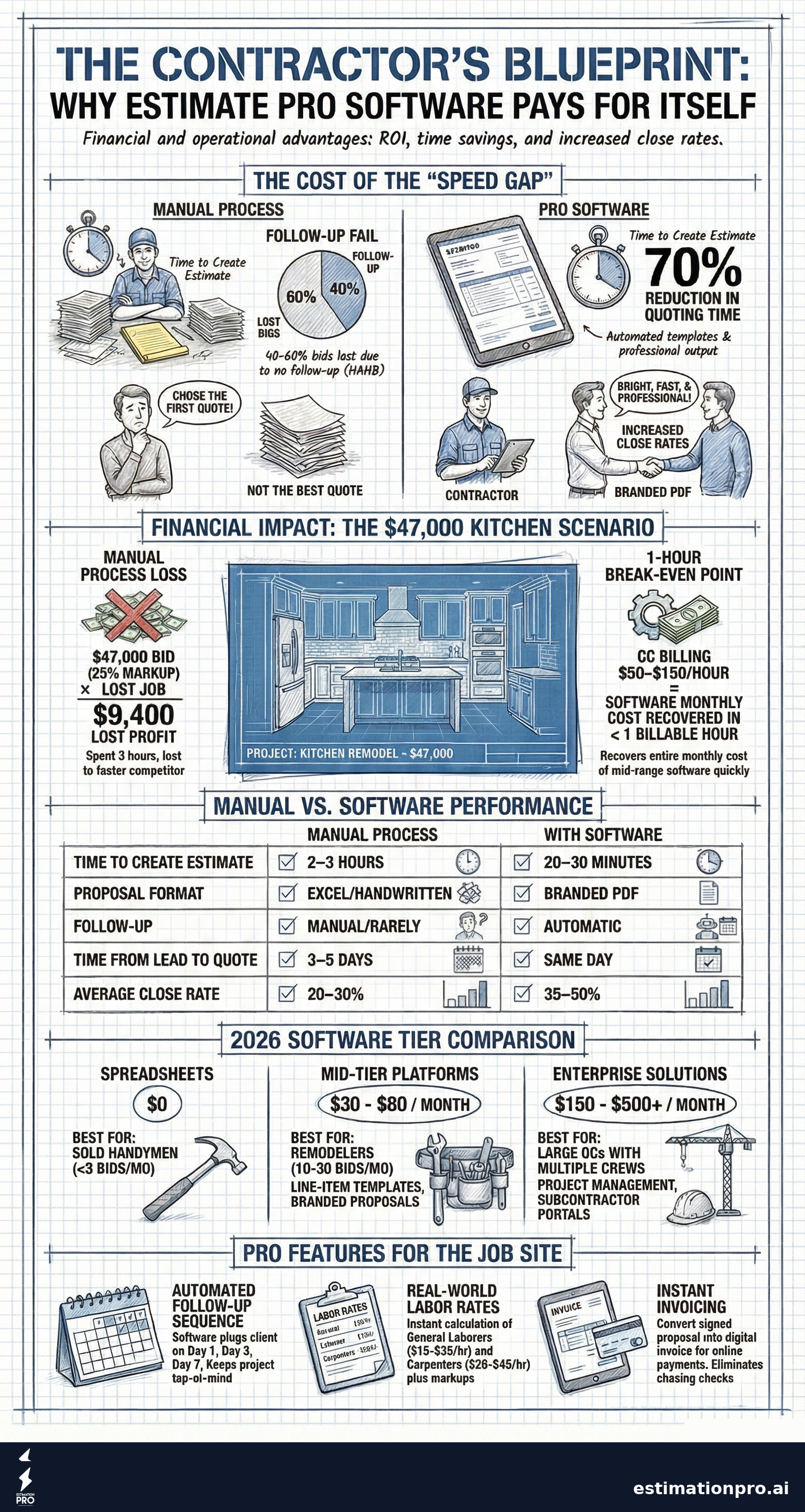
Estimate creation - You build line-item bids using templates, pricing databases, or your own saved rates. A kitchen remodel estimate that takes 2-3 hours by hand takes 20-30 minutes in software. That’s not a guess. That’s what I’ve measured across hundreds of bids.
Proposal generation - The software converts your estimate into a clean, branded PDF that looks professional. No more sending Excel files with broken formulas or handwritten quotes scanned from your truck.
Automated follow-up - This is the feature most contractors don’t know they need until they see it working. After you send a bid, the software sends follow-up emails on a schedule (day 1, day 3, day 7) without you lifting a finger. According to the National Association of Home Builders (NAHB), contractors lose 40-60% of bids simply because they never follow up.
Invoicing and payments - Once the homeowner says yes, you convert the estimate into an invoice and collect payment online. No chasing checks.
Share This Infographic
Feel free to share this infographic on your website. Just copy the embed code below:
Copy this embed code:
<a href="https://estimationpro.ai/tools/blog/contractor-estimate-pro-software" target="_blank" rel="noopener">
  <img src="https://estimationpro.ai/tools/blog/infographics/contractor-estimate-pro-software-infographic.png" alt="contractor estimate pro software infographic by EstimationPro.AI" style="max-width:100%;height:auto" loading="lazy" />
</a>
<p style="font-size:12px;color:#64748B;margin-top:8px">Source: <a href="https://estimationpro.ai/tools/blog/contractor-estimate-pro-software">EstimationPro.AI</a></p>
The Real Cost of Not Using Software
Let me walk through the math because this is where most contractors get stuck. They see $30-80/month and think it’s an expense. It’s not.
Example 1: The Lost Kitchen Bid
You’re bidding a mid-range kitchen remodel. Your estimate comes in at $47,000 (a typical PNW kitchen, including materials, labor at $20-45/hour for carpenters, and your 20-25% overhead and profit markup).
- You spend 3 hours building the estimate manually
- You email it over and move on to the next job
- The homeowner gets three bids. Yours was accurate, but the other contractor sent his quote 2 days sooner and followed up with a phone call
- You lost a $47,000 job. Your profit on that job (at 25% O&P) would have been roughly $9,400
That single lost job costs more than 10 years of software subscriptions.
Example 2: The Follow-Up That Closed
Same scenario, but you’re using estimating software:
- Estimate takes 25 minutes using your saved line items
- Software generates a branded PDF proposal and emails it that afternoon
- Day 3: automatic follow-up goes out asking if they have questions
- Day 7: another follow-up with a polite nudge
- The homeowner responds on day 4 and books the project
| Metric | Manual Process | With Software |
|---|---|---|
| Time to create estimate | 2-3 hours | 20-30 minutes |
| Proposal format | Excel or handwritten | Branded PDF |
| Follow-up sent | Maybe, if you remember | Automatic (day 1, 3, 7) |
| Time from lead to quote | 3-5 days | Same day |
| Close rate (industry avg) | 20-30% | 35-50% |
Sources: NAHB 2025 Remodeler Survey on close rates; HomeAdvisor/Angi contractor response time data.
Features That Separate Pro Software from Basic Tools
Not all estimating software is built the same. Here’s what to look for:
Line-item pricing with saved templates
Your bathroom remodel should pull from a template you’ve already built. Tile, labor, fixtures, demo, dumpster. You adjust quantities and rates, not rebuild from scratch every time. A general laborer at $15-35/hour, a carpenter at $20-45/hour, plus your markup - those numbers should auto-populate.
Drag-and-drop estimate editing
You need to move line items between sections without retyping anything. If the homeowner decides to add a backsplash to the kitchen scope, you drag it in from your saved items. Done.
Branded proposals that build trust
Homeowners judge your professionalism before they judge your craftsmanship. A clean proposal with your logo, clear line items, and payment terms tells them you run a real business. A spreadsheet with highlighted cells tells them the opposite.
Automated follow-up sequences
I can’t stress this enough. The follow-up is where jobs are won or lost. Most contractors send the bid and wait. The contractor who follows up on day 3 wins the homeowner’s attention when the initial excitement has faded but the decision hasn’t been made yet.
Invoicing built into the workflow
Estimate turns into proposal. Proposal turns into contract. Contract turns into invoice. One system, one set of data, zero re-entry. Use the Contractor Markup Calculator to dial in your margins before building the estimate.
What Pro Software Costs in 2026
Here’s what you’ll actually pay, broken down honestly:
| Software Tier | Monthly Cost | Best For |
|---|---|---|
| Free/basic tools | $0 | Solo handyman, fewer than 5 bids/month |
| Mid-range platforms | $30 - $80/month | Remodelers, specialty contractors, 10-30 bids/month |
| Enterprise solutions | $150 - $500+/month | Large GCs managing multiple crews and subs |
Most residential remodelers and small contractors land in that mid-range tier. At $50/month, you need to win one extra small job per year to break even. That’s it.
For context: a general contractor billing at $50-150/hour (industry standard per HomeGuide and Angi 2026 data) recovers the monthly software cost in less than one billable hour.
Common Mistakes When Choosing Estimating Software
Picking the cheapest option. Free tools usually mean no follow-up automation, no branded proposals, and no invoicing. You save $50/month and lose $5,000 in jobs you didn’t close.
Choosing enterprise software when you’re a 2-person crew. You don’t need subcontractor portals and Gantt charts. You need fast estimates, clean proposals, and follow-up that runs itself. Paying $300/month for features you’ll never touch is just overhead.
Ignoring the follow-up feature. I’ve talked to contractors who picked their software based on estimating speed alone and completely ignored whether it had follow-up automation. Speed gets the bid out. Follow-up gets the bid signed.
Not using your own pricing data. The best software lets you import your real costs - your labor rates, your material suppliers, your markup percentage. Generic pricing databases are a starting point, not a final answer. Build your templates around what you actually charge in your market.
How to Evaluate Software Before You Buy
Run this test on any estimating software:
-
Build a real estimate - Pick a recent job you already priced. Can you recreate it in under 30 minutes? If the learning curve takes longer than the time savings, it’s not worth it.
-
Send a test proposal - Does the PDF look professional enough to hand to a $60,000 remodel client? Or does it look like it was made in 2008?
-
Check the follow-up - Set up an automatic sequence and send it to your own email. Does it feel natural? Is the timing adjustable? Can you customize the message?
-
Try the invoicing - Convert that test estimate into an invoice. Can the homeowner pay online? This alone saves hours of check-chasing per month.
-
Look at the mobile experience - You’re in the field. On a jobsite. With drywall dust on your hands. Can you pull up and adjust an estimate from your phone? If the answer is no, keep looking.
Check out the Construction Cost Estimator for quick reference pricing when building your first templates.
Spreadsheets vs. Software: A Side-by-Side
I used spreadsheets for years. They work. But they have limits that become obvious once you’re running more than a few jobs at a time.
| Capability | Spreadsheet | Pro Software |
|---|---|---|
| Estimate creation speed | 1-3 hours | 15-30 minutes |
| Branded proposals | Manual formatting | Auto-generated |
| Follow-up automation | None | Built-in sequences |
| Error rate | High (broken formulas) | Low (validated fields) |
| Client payment | Invoice + mail check | Online payment link |
| Template reuse | Copy/paste prone to errors | Click and customize |
| Mobile access | Clunky at best | Designed for field use |
The spreadsheet isn’t wrong. But it’s a handsaw when you could be using a miter saw. Both cut wood. One is faster and more precise.
Frequently Asked Questions
Is contractor estimate pro software worth it for solo contractors?
Yes. Solo contractors benefit the most because you don’t have office staff to handle follow-up and invoicing. The automation handles what would otherwise fall through the cracks when you’re on a jobsite all day. Even at 5 bids per month, converting one extra job per quarter covers the cost many times over.
How long does it take to learn estimating software?
Most mid-range platforms take 1-2 hours to set up and feel comfortable with. The real time investment is building your first set of templates with your pricing. After that, each new estimate starts from a template and takes minutes, not hours.
Can I import my existing estimates into new software?
Most platforms allow CSV imports or manual entry of your pricing data. The initial setup takes an afternoon, but you only do it once. After that, your rates, line items, and templates live in the system permanently.
Does estimating software replace my own pricing knowledge?
No. The software is a tool, not a brain. You still need to know your costs, your market, and your margins. Software makes you faster and more consistent, but the pricing judgment comes from your experience. Use tools like the Contractor Markup Calculator alongside your software to keep your margins honest.
What if I already use QuickBooks?
Most modern estimating platforms integrate with QuickBooks for accounting sync. The estimating software handles the front end (quoting, proposals, follow-up) while QuickBooks handles the back end (bookkeeping, taxes). They complement each other.
What I’d Tell a Contractor Shopping for Software Today
Skip the enterprise platforms unless you’re running 20+ employees. Skip the free tools unless you’re doing fewer than 5 bids a month and don’t care about follow-up.
Find something in the mid-range that does four things well: builds estimates fast, generates clean proposals, follows up automatically, and handles invoicing. That covers 90% of what a residential remodeler needs.
Prices and labor rates vary by region, project scope, and market conditions. The figures in this post reflect 2026 national averages and Pacific Northwest pricing. Always verify costs against your local market.
Contractors on Capterra rate EstimationPro 4.8/5 for ease of use and time savings on estimates. EstimationPro handles the full cycle - estimate, proposal, automated follow-up, invoice, payment - so you’re not juggling three different tools. Try EstimationPro free and build your first estimate in under 30 minutes.
Pricing a job like this?
Get every line item priced for your area in a full estimate
Describe the job or snap a few photos. Send it from EstimationPro and it follows up with your client for you.
3 free estimates in the first 7 days. No credit card.
Contractor Estimating Software Tiers
- Full manual data entry
- No follow-up automation
- No branded proposals
- Error-prone formulas
- Line-item templates
- Branded PDF proposals
- Basic invoicing
- Some follow-up tools
- Full project management
- Subcontractor portals
- Advanced reporting
- Steep learning curve
Get Free Estimating Tips
Enter your email and we'll send you pro tips, cost data, and useful resources for contractors.
We'll send helpful resources and occasional tips. Unsubscribe anytime.
 EstimationPro AI For Contractors, By Contractors
 Save 2+ Hours on Every Estimate
Upload photos, record voice notes, and get AI-powered estimates with line items, material lists, and regional pricing.