

Three weeks behind schedule and the homeowner is calling twice a day. The tile crew showed up before the plumber finished rough-in. The cabinet order was placed two weeks late because nobody tracked the lead time. Sound familiar?
I’ve been on that job. More than once, early in my career. The fix wasn’t working harder or hiring faster. It was writing down the schedule in a way that actually showed what depends on what, and when everything needs to happen. That’s a gantt chart, and it’s one of the simplest tools that separates organized contractors from the ones constantly playing catch-up.
Quick Answer
A gantt chart is a visual project schedule that shows every task as a horizontal bar across a timeline. Each bar represents one task, its start date, duration, and end date. Tasks that depend on other tasks are linked so you can see the entire sequence at a glance. For construction, this means mapping out phases like demo, rough-in, inspections, and finish work so nothing overlaps that shouldn’t, and nothing gets missed.
Try EstimationPro free to build your estimate first, then use the template below to schedule the work.
Download the Template
We built a free, printable construction gantt chart template specifically for remodeling and residential construction. It covers 9 phases and 30+ common tasks.
Download the Construction Gantt Chart Template - opens in your browser, then hit Print or Ctrl+P to save as PDF.
The template is pre-loaded with a typical kitchen remodel timeline, but you can print it blank and fill in your own dates for any project type. Use our Square Footage Calculator alongside this template to get accurate room measurements before you start scheduling.
What Makes a Construction Gantt Chart Different
Generic project management gantt charts miss the realities of construction. A software project doesn’t have inspections that stop all work until passed. An office renovation doesn’t have 6-week cabinet lead times. Construction has dependencies that other industries don’t, and your schedule needs to reflect that.
Here’s what a construction gantt chart must include that generic templates skip:
- Inspection hold points - work stops until the inspector signs off
- Material lead times - cabinets, custom tile, special-order fixtures
- Trade sequencing - electricians before drywall, plumbing before tile
- Permit processing - 2 to 8 weeks depending on your municipality
- Weather contingency - for any exterior work
- Client decision deadlines - the date by which selections must be finalized or the schedule slips
The 9 Phases Every Remodel Schedule Needs
| Phase | Typical Duration | Depends On |
|---|---|---|
| Pre-Construction (design, permits, ordering) | 3-8 weeks | Contract signed |
| Demo & Tear-Out | 2-5 days | Permits approved |
| Structural & Framing | 3-7 days | Demo complete |
| Rough-In (electrical, plumbing, HVAC) | 5-10 days | Framing complete |
| Inspections | 1-5 days (wait time) | Rough-in complete |
| Insulation & Drywall | 5-8 days | Inspections passed |
| Finish Work (cabinets, counters, tile, paint) | 10-20 days | Drywall complete + materials delivered |
| Fixtures, Trim & Hardware | 3-5 days | Finish work complete |
| Final Inspection, Punch List & Handoff | 2-5 days | All work complete |
These phases run roughly in sequence, but some overlap. Electrical trim happens after paint. Plumbing fixtures go in after tile. Your gantt chart shows exactly where the overlaps are and where they aren’t allowed.
Worked Example: Kitchen Remodel (6-Week Build)
Here’s a real timeline I’d use for a mid-range kitchen remodel, roughly $45,000 in the Pacific Northwest. This assumes permits are already in hand and cabinets were ordered during pre-construction.
| Task | Week 1 | Week 2 | Week 3 | Week 4 | Week 5 | Week 6 |
|---|---|---|---|---|---|---|
| Demo & haul-off | Mon-Wed | |||||
| Framing modifications | Thu-Fri | |||||
| Electrical rough-in | Mon-Wed | |||||
| Plumbing rough-in | Mon-Wed | |||||
| Rough inspection | Thu | |||||
| Insulation | Fri | |||||
| Drywall hang + tape + mud | Mon-Fri | |||||
| Cabinet install | Mon-Wed | |||||
| Countertop template + install | Thu + following Wed | |||||
| Tile backsplash | Mon-Tue | |||||
| Paint | Wed-Thu | |||||
| Electrical trim (outlets, switches, lights) | Fri | |||||
| Plumbing trim (faucet, disposal, dishwasher) | Fri | |||||
| Hardware, trim, touch-up | Mon-Tue | |||||
| Final inspection | Wed | |||||
| Punch list + cleaning | Thu-Fri |
Notice the countertop gap. After the template (measuring) on Thursday of week 4, there’s usually a 4-5 business day fabrication wait before install. That gap is where tile, paint, and electrical trim happen. If you don’t plan for that gap, your crew sits idle for a week.
Worked Example: Bathroom Remodel (4-Week Build)
A standard bathroom gut-and-replace runs about $25,000-$35,000 and fits into roughly 4 weeks of active work, assuming materials are on-site.
| Task | Week 1 | Week 2 | Week 3 | Week 4 |
|---|---|---|---|---|
| Demo (gut to studs) | Mon-Tue | |||
| Plumbing rough-in (shower valve, drain relocation) | Wed-Thu | |||
| Electrical rough-in | Thu-Fri | |||
| Rough inspection | Mon | |||
| Backer board & waterproofing | Tue-Wed | |||
| Tile (shower walls + floor) | Thu-Fri | Mon-Tue | ||
| Vanity + plumbing connections | Wed | |||
| Paint | Thu | |||
| Fixtures (mirror, towel bars, accessories) | Fri | |||
| Electrical trim (fan, lights, GFCI outlets) | Mon | |||
| Glass shower door install | Tue | |||
| Final inspection | Wed | |||
| Punch list + caulk + cleaning | Thu |
The waterproofing step is the one people forget on the schedule. Products like Kerdi or RedGard need cure time before you can tile over them, and that’s a full day minimum. Skip it on the schedule and you’ve pushed tile back a day, which pushes everything else.
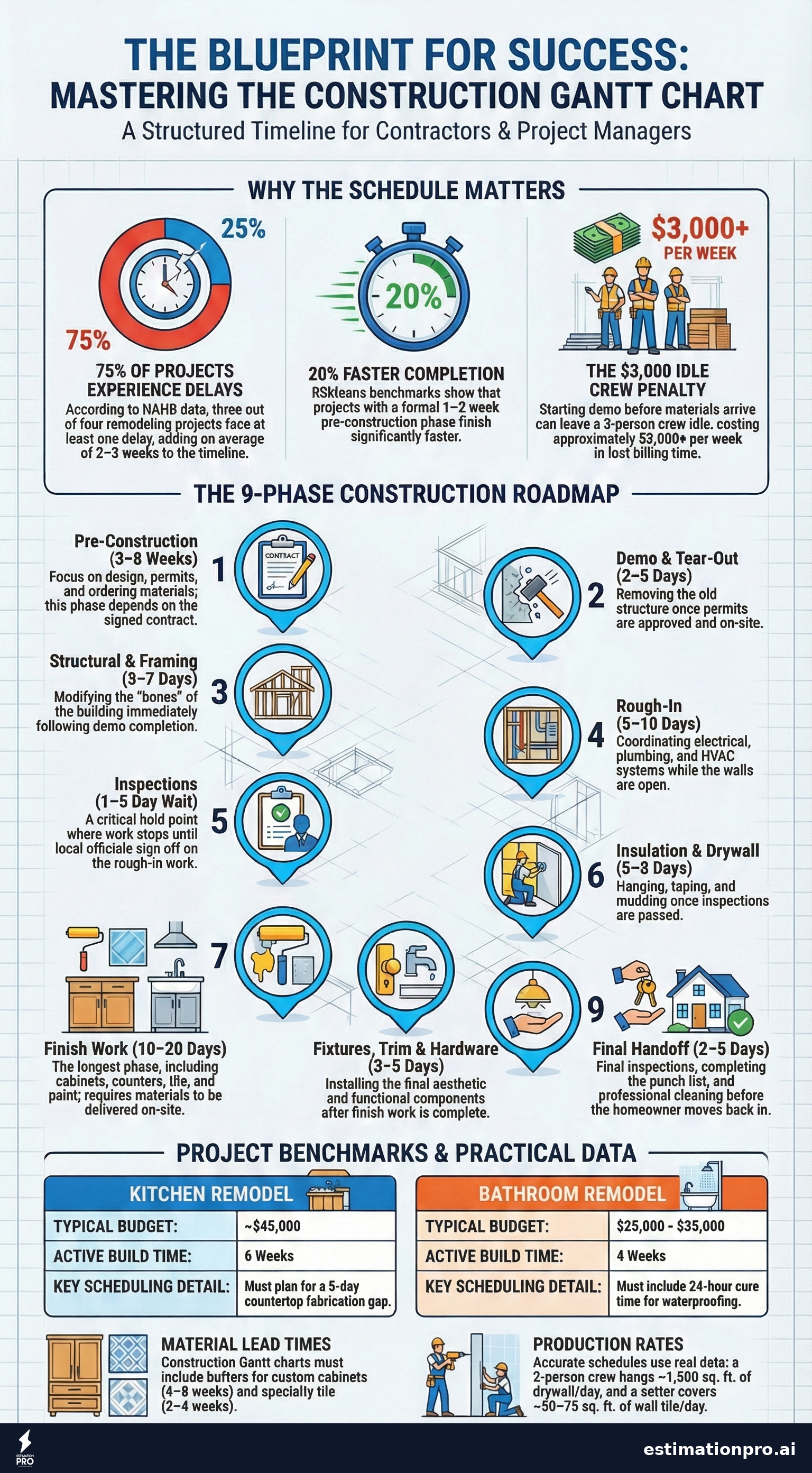
Share This Infographic
Feel free to share this infographic on your website. Just copy the embed code below:
Copy this embed code:
<a href="https://estimationpro.ai/tools/blog/gantt-chart-template" target="_blank" rel="noopener">
  <img src="https://estimationpro.ai/tools/blog/infographics/gantt-chart-template-infographic.png" alt="gantt chart template infographic by EstimationPro.AI" style="max-width:100%;height:auto" loading="lazy" />
</a>
<p style="font-size:12px;color:#64748B;margin-top:8px">Source: <a href="https://estimationpro.ai/tools/blog/gantt-chart-template">EstimationPro.AI</a></p>
How to Customize the Template for Your Project
- Start with the estimate. Your line-item estimate defines the scope. Every line item maps to at least one task on the gantt chart.
- List every task in order. Walk through the project mentally, phase by phase. What has to happen before the next thing can start?
- Assign durations. Use production rates, not guesses. A two-person crew hangs roughly 1,500 square feet of drywall per day. A tile setter covers about 50-75 square feet of wall tile per day. Real numbers keep the schedule honest.
- Mark dependencies. Draw arrows between tasks. Plumbing rough-in depends on demo completion. Drywall depends on passing rough inspection. These arrows prevent the scheduling collisions that blow up timelines.
- Add lead times. Custom cabinets: 4-8 weeks. Stone countertops: 5-7 business days after template. Specialty tile: 2-4 weeks. Order dates go on the gantt chart too.
- Build in buffer. I add 10-15% schedule contingency on every job. If the schedule says 6 weeks, I tell the homeowner 7. Per NAHB data, 75% of remodeling projects experience at least one delay, and the average delay adds 2-3 weeks. Under-promise, over-deliver.
Scheduling Mistakes That Cost Real Money
Starting work before materials arrive. I’ve seen contractors demo a kitchen before confirming the cabinet delivery date. Crew finishes rough-in in two weeks, then sits idle for four weeks waiting on cabinets at $50-$150/hour in lost billing time per person (BLS general contractor billing rates, 2024). On a three-person crew, that’s $3,000+ per week in dead time.
Forgetting inspection lead times. Some jurisdictions schedule inspections 24 hours out. Others need 3-5 business days. If your gantt chart assumes next-day inspections and the building department runs a week behind, your entire timeline shifts.
Not tracking client decisions. “We haven’t picked the tile yet” is the number one schedule killer on residential remodels. Your gantt chart should include a deadline for every client selection, placed far enough ahead of the installation date to allow for ordering and delivery.
Overlapping trades in tight spaces. A bathroom is 50 square feet. You can’t have the electrician, plumber, and tile guy in there at the same time. Sequence them on the chart even when their work could theoretically overlap.
Skipping the pre-construction phase entirely. The temptation is to start swinging hammers on day one. But according to RSMeans scheduling benchmarks, projects with a formal pre-construction phase (even just one to two weeks of planning) complete 20% faster than those that skip it. Planning saves more time than it costs. Every time.
Gantt Chart Tools vs. Paper
You don’t need expensive software to make a gantt chart work. Here are your options:
| Method | Cost | Best For |
|---|---|---|
| Printed template (like ours) | Free | Single jobs, handoffs to subs |
| Excel / Google Sheets | Free | Basic scheduling, easy sharing |
| Microsoft Project | $10-55/month | Complex multi-phase commercial work |
| Monday.com / Smartsheet | $10-25/month | Teams needing real-time collaboration |
| Pen and whiteboard | Free | Daily crew coordination on-site |
For most residential remodelers, a printed template or a simple spreadsheet is all you need. I used a whiteboard in my shop for years before going digital. The tool matters less than actually doing it.
The real value comes when you pair the schedule with your estimate. When you know the cost and the timeline, you can plan cash flow, schedule subs, and set realistic expectations with the homeowner all at once. Try EstimationPro free to build the estimate, then use the gantt chart to schedule the work.
FAQ
How detailed should a construction gantt chart be?
Detailed enough that every trade knows their start date. For residential remodels, 20-40 tasks is typical. You don’t need to schedule every nail, but every phase, inspection, and material delivery should have its own line. If a sub asks “when do I show up?” the gantt chart should answer that question instantly.
Can I use a gantt chart for small jobs like a single bathroom?
Yes. Even a 2-week bathroom remodel benefits from scheduling. The biggest value on small jobs is tracking material lead times and inspection hold points, which are the two things that cause the most delays regardless of project size. My bathroom remodel cost guide covers what goes into pricing these projects.
What’s the difference between a gantt chart and a construction schedule?
They’re the same thing, displayed differently. A construction schedule might be a simple list of tasks with dates. A gantt chart takes that same data and shows it visually as bars on a timeline, making it easy to spot overlaps, gaps, and dependencies. The visual format is what makes gantt charts useful for communicating with homeowners and subs.
How often should I update the gantt chart during a project?
Weekly at minimum. Update it every time something shifts: a failed inspection, a late delivery, a change order. The chart is only useful if it reflects reality. Tape a printed copy to the wall in the work area so the whole crew sees the current plan every morning.
Do homeowners care about gantt charts?
More than you’d think. Homeowners want to know when each phase starts and ends, especially if they’re living in the house during the remodel. A printed gantt chart handed over at the pre-construction meeting builds trust and reduces the “when will this be done?” calls by 80%.
All cost figures are approximate 2026 national averages. Actual prices vary by region, market conditions, and project scope. Get a detailed estimate for your specific project before committing to a budget.
Plan the Work, Then Work the Plan
Every project I’ve run on a gantt chart finished closer to the original timeline than the ones I winged. Not because gantt charts are magic, but because writing down the sequence forces you to think through the dependencies before you’re standing on the jobsite figuring it out on the fly.
Contractors using EstimationPro build their line-item estimates in minutes, then send professional proposals with automated follow-up sequences that keep homeowners engaged while you focus on the work. The estimate feeds the schedule, the schedule keeps the project on track, and the follow-up system makes sure you win more of the bids you send. Try EstimationPro free to see how it all fits together.
Pricing a job like this?
Get every line item priced for your area in a full estimate
Describe the job or snap a few photos. Send it from EstimationPro and it follows up with your client for you.
3 free estimates in the first 7 days. No credit card.
Get Free Estimating Tips
Enter your email and we'll send you pro tips, cost data, and useful resources for contractors.
We'll send helpful resources and occasional tips. Unsubscribe anytime.
 EstimationPro AI For Contractors, By Contractors
 Save 2+ Hours on Every Estimate
Upload photos, record voice notes, and get AI-powered estimates with line items, material lists, and regional pricing.