

Three hours. That’s how long I used to spend on a single kitchen remodel estimate. Measuring every wall, pricing every cabinet, cross-referencing supplier catalogs, double-checking the math. By the time I finished the bid, two other contractors had already sent theirs.
The homeowner went with someone else. Not because they were better. Because they were faster.
That experience is what pushed me toward AI estimating. Not because I wanted to replace the knowledge I’ve built over 20 years of remodeling, but because I was tired of losing jobs to speed while I was busy getting the numbers right.
Quick Answer: What Is AI Estimating?
AI estimating uses machine learning to generate construction cost estimates from photos, notes, measurements, or project descriptions. Instead of manually pricing every line item, the AI pulls from pricing databases, regional cost data, and historical project patterns to produce a detailed estimate in minutes. Most AI estimating tools produce accuracy within 10-15% of a professional manual takeoff, with the contractor reviewing and adjusting before sending the bid.
Try EstimationPro free to see how AI estimating works for your next bid.
Why Manual Estimating Costs You More Than You Think
Here’s math most contractors never do. If you bill at $50-$150 per hour (the typical general contractor rate per HomeGuide 2026 data), and you spend 3 hours on a manual estimate, that bid cost you $150-$450 in unbilled time. Win rate on residential remodel bids averages around 25-30% according to NAHB benchmarks. That means three out of four estimates are time you never get paid for.
| Estimating Method | Time per Bid | Cost at $90/hr | Bids per Week | Monthly Unbilled Time |
|---|---|---|---|---|
| Manual spreadsheet | 3-4 hours | $270-$360 | 3-4 | 36-48 hours |
| Template-based | 1.5-2 hours | $135-$180 | 5-6 | 18-24 hours |
| AI-assisted | 20-45 min | $30-$68 | 8-12 | 5-9 hours |
That monthly difference is real money. At $90/hr, going from manual to AI-assisted saves roughly $7,200-$10,800 per year in recovered productive time. That’s time you could spend on actual paying work or, better yet, getting home to your family.
How AI Estimating Actually Works (Step by Step)
This isn’t magic. It’s pattern recognition applied to construction data. Here’s the real workflow:
1. Input Your Project Info
You feed the AI your project details. Depending on the tool, this could be:
- Photos of the existing space (kitchen, bathroom, exterior)
- Voice notes describing the scope (“gut the kitchen, new cabinets, quartz counters, LVP flooring”)
- Measurements from a tape or laser measure
- Plan takeoffs from blueprints or architectural drawings
The more detail you provide, the better the output. Garbage in, garbage out applies here just like anywhere else.
2. The AI Matches Your Scope to Pricing Data
Behind the scenes, the AI cross-references your inputs against:
- Regional pricing databases adjusted for your metro area (labor in Seattle costs different than labor in rural Alabama)
- Material cost indexes updated from manufacturer and supplier data
- Historical project data from similar completed jobs
- Assembly-level pricing that groups related line items (a “bathroom rough-in” includes supply lines, drain, vent, and fittings)
This is where AI has an edge. It can compare against thousands of data points instantly. I’m good, but I can’t mentally cross-reference 300+ pricing items in real time.
3. Review, Adjust, Send
Here’s the part a lot of people miss. AI doesn’t replace the contractor’s judgment. It gives you a solid first draft. You still need to:
- Check for scope items the AI might have missed (hidden work behind walls, unusual site conditions)
- Adjust for complexity (a 1920s home with knob-and-tube wiring needs different pricing than a 2015 build)
- Apply your markup and overhead (typical 10-50% markup depending on project type, per industry standards)
- Add contingency for the unknowns
I’d compare it to spell-check for writing. Spell-check catches 90% of errors, but you still read the document before sending it. Same idea.
Accuracy: Real Numbers, Not Marketing Claims
Let’s be honest about what AI can and can’t do.
What AI handles well:
- Standard scope items with predictable pricing (materials, common labor tasks)
- Regional cost adjustments based on BLS and supplier data
- Assembly-level estimates where components are well-defined
- Quantity calculations from measurements
Where AI struggles:
- Hidden conditions (rot behind walls, outdated wiring, foundation issues)
- Custom or unusual work that doesn’t match standard assemblies
- Highly specialized trades with limited pricing data
- Client-specific complexity factors
Based on field testing, AI estimating tools typically hit within 10-15% of a professional manual takeoff on standard residential remodeling work. That’s good enough for a bid, especially when you’re reviewing and adjusting before sending. For comparison, even experienced estimators vary by 5-10% from each other on the same project, according to RSMeans benchmarking data.
The key number: you’re not trying to be perfect on the first pass. You’re trying to be close enough that your review time drops from hours to minutes.
Worked Example: AI Estimate for a Bathroom Remodel
Let’s walk through a real scenario.
Project: Full bathroom remodel, 8x10 space, gut to studs, new everything.
What you input: Photos of existing bathroom, dimensions (8x10), scope notes: “new vanity, toilet, tub/shower combo, ceramic tile floor and tub surround, updated plumbing fixtures, new exhaust fan, paint.”
What AI generates (typical output):
| Line Item | Quantity | Unit Cost | Total |
|---|---|---|---|
| Demo and haul-off | 80 sq ft | $3.50/sq ft | $280 |
| Rough plumbing | 1 bathroom | $2,800 lump | $2,800 |
| Electrical (fan, GFCI, lighting) | 1 bathroom | $1,200 lump | $1,200 |
| Cement board + waterproofing | 250 sq ft | $4.25/sq ft | $1,063 |
| Ceramic tile (floor + surround) | 200 sq ft | $8.50/sq ft | $1,700 |
| Vanity + countertop (installed) | 1 unit | $1,800 | $1,800 |
| Toilet (installed) | 1 unit | $450 | $450 |
| Tub/shower (installed) | 1 unit | $1,400 | $1,400 |
| Paint and trim | 200 sq ft | $2.50/sq ft | $500 |
| Subtotal | $11,193 | ||
| O&P (25%) | $2,798 | ||
| Total | $13,991 |
What you adjust: Maybe you know the tile they want is $12/sq ft installed, not $8.50. Maybe the plumbing needs rerouting because the drain is in the wrong spot. You tweak three or four lines and the estimate is ready to send. Total time: 25 minutes instead of 3 hours.
Use our Bathroom Remodel Cost Calculator to run your own numbers.
Worked Example: Quick Garage Estimate
Project: Detached 2-car garage, 24x24, slab on grade, basic finish.
AI output: $38,000-$52,000 total (framing, concrete, roofing, electrical, siding, one service door, one 16-ft overhead door).
Your review catches: Site needs grading and a French drain because the lot slopes toward the build location. Add $3,500-$5,000 for site work the AI couldn’t see from photos alone. Adjusted range: $41,500-$57,000.
Total time from input to adjusted estimate: 20 minutes. See our Garage Cost Calculator for specific breakdowns.
Five Mistakes Contractors Make with AI Estimating
1. Sending the AI output without reviewing it. This is the fastest way to lose money. AI doesn’t know about the rotted subfloor you’ll find on demo day. Always review.
2. Not feeding it enough detail. “Remodel a bathroom” gives you a generic estimate. “Gut 8x10 bathroom, replace tub with walk-in shower, heated tile floor, dual vanity” gives you something useful.
3. Ignoring regional pricing. An estimate based on national averages will be wrong for your market. Make sure your tool adjusts for your metro area. Labor rates swing 40-60% between metros, per BLS Occupational Employment data.
4. Skipping the contingency. AI estimates standard scope. It doesn’t add 10-15% for the surprises hiding behind drywall. I’ve been burned by underbidding jobs where the hidden scope blew up once the walls came open. Always add contingency.
5. Using AI for custom work without heavy editing. A standard kitchen remodel? Great fit. A historic home restoration with plaster walls and period-correct millwork? You’re going to be rewriting most of the estimate anyway.
AI Estimating vs. Traditional Methods
| Factor | Manual Spreadsheet | Template/Software | AI-Assisted |
|---|---|---|---|
| Speed | 3-4 hours | 1.5-2 hours | 20-45 minutes |
| Accuracy (standard work) | 95-100% (expert) | 90-95% | 85-95% |
| Learning curve | Years of experience | Weeks | Hours |
| Hidden condition handling | Strong (field knowledge) | Moderate | Weak (needs human review) |
| Scalability | 3-4 bids/week | 5-6 bids/week | 8-12 bids/week |
| Cost per estimate | $270-$360 | $135-$180 | $30-$68 |
The sweet spot for most contractors: use AI for the first pass, then apply your field knowledge for the final review. You get the speed of AI with the accuracy of experience.
When to Override the AI (And When to Trust It)
Trust the AI when:
- The project is standard scope with common materials
- Your tool has regional pricing for your area
- The line items match assemblies you’ve done before
- Material prices are current (check the data freshness)
Override the AI when:
- You’ve been inside the house and spotted problems the photos don’t show
- The client wants specialty or custom materials
- The home is pre-1970 (expect code upgrades, lead paint, asbestos abatement)
- Access is difficult (second story, tight lot, no parking for deliveries)
My rule of thumb: if I’ve done 10+ jobs like this, I trust the AI estimate with minor tweaks. If it’s unusual work I haven’t seen before, I use the AI as a starting point and rebuild significant sections manually.
What This Means for Your Business
Speed wins bids. That’s not opinion. It’s what I’ve seen over and over. The contractor who gets a professional estimate to the homeowner first has a real advantage, because homeowners often go with whoever responds quickly and looks professional.
AI estimating doesn’t make you a better builder. It doesn’t replace 20 years of knowing what things cost and how long they take. What it does is take the repetitive number-crunching off your plate so you can focus on the parts that actually need your expertise: evaluating site conditions, managing client expectations, and doing the work right.
For a solo operator or small crew, that means more bids per week without working late. For a growing company, it means you can scale without hiring a full-time estimator at $50,000-$70,000 per year (per BLS 13-1051 cost estimator median salary data).
Frequently Asked Questions
How accurate is AI estimating compared to a professional estimator?
On standard residential remodeling work, AI estimating tools typically land within 10-15% of a professional manual takeoff. That’s accurate enough for bidding when you review and adjust before sending. Even professional estimators vary 5-10% from each other on identical projects, per RSMeans data.
Can AI estimating replace my experience?
No. AI handles the math and data lookup. You bring the field knowledge: hidden conditions, client complexity, site-specific factors, and the judgment call on what the numbers should actually be. Think of it as a very fast research assistant, not a replacement.
What do I need to get started with AI estimating?
At minimum, a smartphone for photos and a project description. More detail (measurements, specific material selections, scope notes) produces better results. Most AI estimating platforms work from a browser or mobile app, no special hardware needed.
Is AI estimating accurate for commercial work?
It depends on scope. Standard commercial interiors (office buildouts, retail spaces) work reasonably well. Heavy civil, industrial, or highly specialized commercial work typically needs traditional estimating methods. The AI data is strongest on residential.
How much does AI estimating software cost?
Ranges from free tiers with limited features to $50-$200/month for full platforms. Compare that to the $270-$360 per manual estimate in your unbilled time, and the math makes sense after two or three bids.
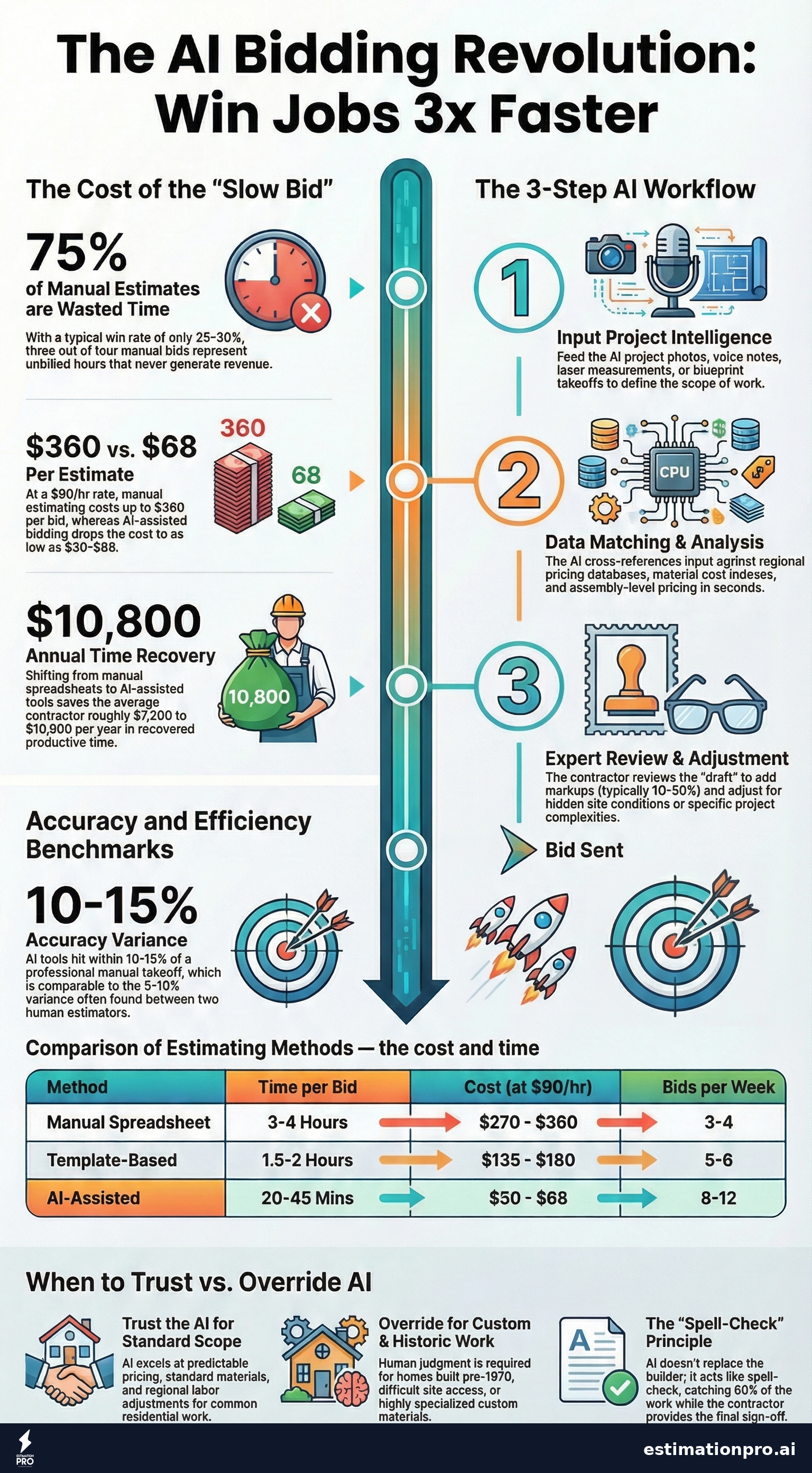
Share This Infographic
Feel free to share this infographic on your website. Just copy the embed code below:
Copy this embed code:
<a href="https://estimationpro.ai/tools/blog/ai-estimating" target="_blank" rel="noopener">
  <img src="https://estimationpro.ai/tools/blog/infographics/ai-estimating-infographic.png" alt="ai estimating infographic by EstimationPro.AI" style="max-width:100%;height:auto" loading="lazy" />
</a>
<p style="font-size:12px;color:#64748B;margin-top:8px">Source: <a href="https://estimationpro.ai/tools/blog/ai-estimating">EstimationPro.AI</a></p>
Contractors on Capterra rate EstimationPro 4.8/5 for time savings on residential bids. EstimationPro doesn’t just generate the estimate - it builds the proposal, sends it to your client, and follows up automatically so you win more of the bids you already send. Try EstimationPro free and see what you can do with 3 extra hours per bid.
Get Free Estimating Tips
Enter your email and we'll send you pro tips, cost data, and useful resources for contractors.
We'll send helpful resources and occasional tips. Unsubscribe anytime.
 EstimationPro AI For Contractors, By Contractors
 Create Detailed Estimates in Minutes, Not Hours
Upload photos, record voice notes, and get AI-powered estimates with line items, material lists, and regional pricing.