

Last Tuesday I was sitting in my truck after a walkthrough, typing notes into my phone before I forgot anything. Square footage, fixture counts, potential rot behind the shower wall. By the time I got home, I had three voicemails from other leads wanting bids. That’s the reality. You’re juggling active jobs, new leads, and follow-ups - all while trying to put together accurate numbers.
That’s exactly why bid management software exists. And if you’re still running your bidding process through spreadsheets, email threads, and sticky notes, you’re leaving money on the table.
Quick Answer
Bid management software helps contractors organize, create, track, and follow up on estimates and proposals from a single platform. The best options for residential contractors cost between $49 and $199 per month and include estimating, proposal generation, and automated follow-up tools. The right choice depends on your trade, crew size, and how many bids you’re sending each month.
Try EstimationPro free - it handles estimating, proposals, follow-up sequences, and invoicing in one workflow.
What Contractors Actually Need vs. What Most Software Delivers
Here’s where the market falls short. Most “bid management” tools were built for commercial GCs running $5M+ projects with plan rooms, subcontractor prequalification, and bid leveling features that a bathroom remodeler will never touch. You’re paying for complexity you don’t need.
What residential and small commercial contractors actually need:
- Fast estimate creation - minutes, not hours
- Professional proposals that look clean on a phone screen
- Automated follow-up so leads don’t go cold
- Job tracking from bid to payment
- Mobile access - you’re in the field, not at a desk
That’s it. Five things. Yet most platforms bury these under enterprise features that slow you down.
The Real Cost of No System
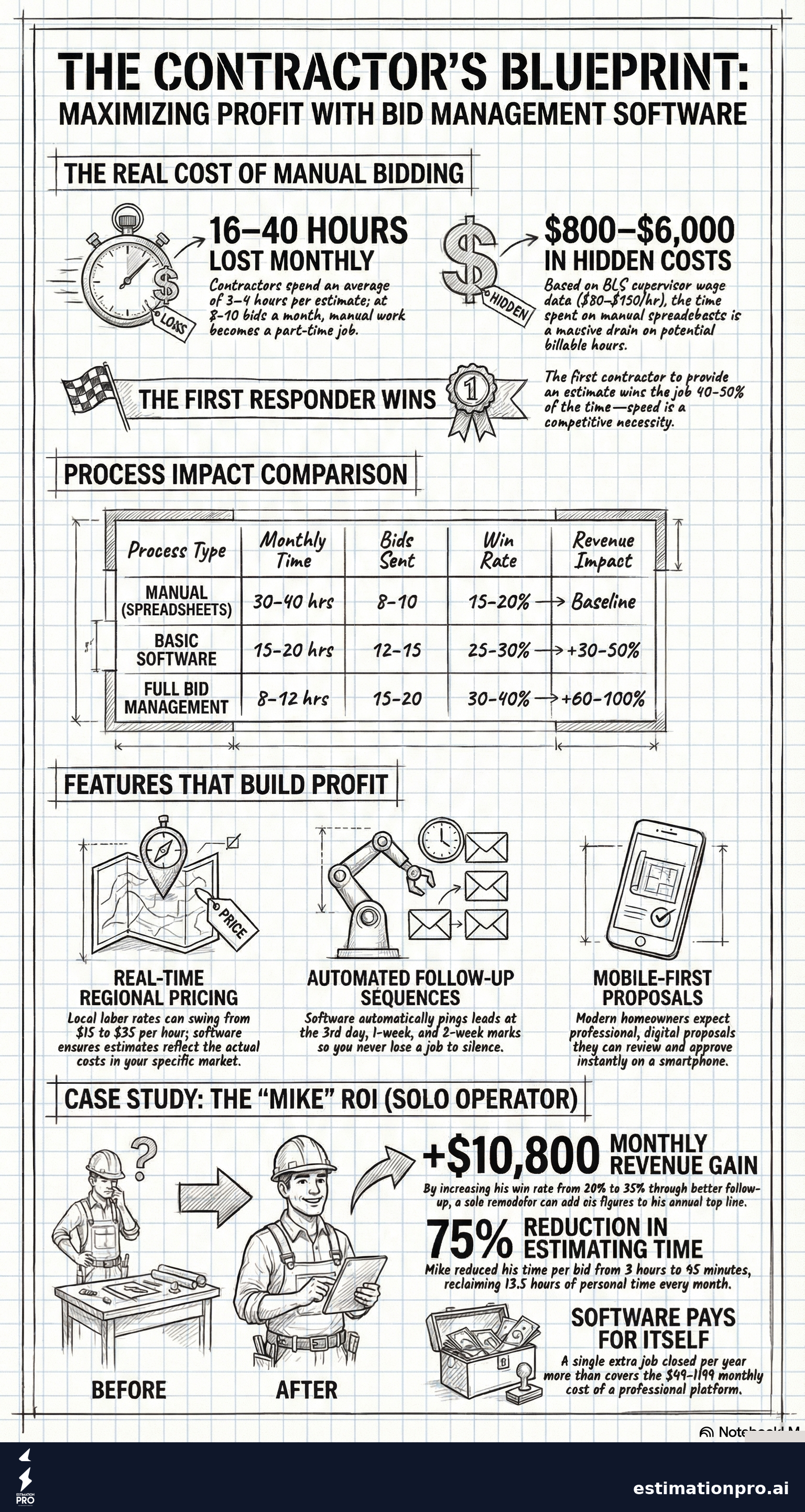
Before we compare tools, let me put a number on the problem. According to NAHB data, contractors spend an average of 2-4 hours per estimate on residential remodels. If you’re sending 8-10 bids a month, that’s 16-40 hours just on estimating. At a general contractor billing rate of $50-$150 per hour (BLS 47-1011 supervisor wage data), the time cost alone runs $800-$6,000 per month.
Then there’s the bids you lose because you were too slow. Homeowners typically collect 3-5 estimates, and research from the Home Improvement Research Institute shows the first contractor to respond wins the job 40-50% of the time. Speed matters.
| Scenario | Monthly Time | Bids Sent | Win Rate | Revenue Impact |
|---|---|---|---|---|
| Manual process (spreadsheets) | 30-40 hrs | 8-10 | 15-20% | Baseline |
| Basic software | 15-20 hrs | 12-15 | 25-30% | +30-50% |
| Full bid management platform | 8-12 hrs | 15-20 | 30-40% | +60-100% |
Those aren’t made-up numbers. I’ve lived both sides. When I was running estimates on paper and Excel, I’d lose track of which leads I’d followed up with and which ones had gone cold. Now I can see every bid in one place and know exactly where each one stands.
Features That Matter (and Features That Don’t)
Must-Have Features
1. Estimating engine with real pricing data
Your bid management tool needs to actually help you build accurate estimates. That means material costs, labor rates, and markup calculations - not just blank line items you fill in from scratch every time.
Look for tools that include regional pricing data. A kitchen remodel in Seattle doesn’t cost the same as one in rural Oklahoma. The difference in labor alone (general construction laborers range from $15-$35/hour depending on market, per BLS data) can swing a bid by thousands.
2. Proposal generation
A bid that shows up as a PDF attachment is 2026’s equivalent of a fax. Homeowners expect something clean they can review on their phone. The software should turn your estimate into a professional proposal with one click.
3. Follow-up automation
This is the feature most contractors don’t know they need until they have it. You send a bid. The homeowner says they’ll think about it. Then nothing. Three weeks later they hired someone else.
Automated follow-up sequences solve this. The software sends a check-in email 3 days after you send the proposal, another one a week later, and maybe a final touch at the two-week mark. You don’t have to remember. It just happens.
4. Mobile access
If you can’t pull up a bid on your phone at the jobsite, the software is useless. Period.
Nice-to-Have Features
- Invoicing and payment collection - keeps everything in one place
- Photo and note capture - attach walkthrough photos to the bid
- Client communication log - every email, text, and call tracked
- Material takeoff integrations - pull quantities from plans
- Reporting and analytics - see your win rate, average bid size, revenue pipeline
Features You Don’t Need (Unless You’re a Large GC)
- Plan room / bid board access
- Subcontractor prequalification
- Bid leveling and comparison sheets
- Multi-office collaboration
- Union wage compliance tracking
Share This Infographic
Feel free to share this infographic on your website. Just copy the embed code below:
Copy this embed code:
<a href="https://estimationpro.ai/tools/blog/bid-management-software" target="_blank" rel="noopener">
  <img src="https://estimationpro.ai/tools/blog/infographics/bid-management-software-infographic.png" alt="bid management software infographic by EstimationPro.AI" style="max-width:100%;height:auto" loading="lazy" />
</a>
<p style="font-size:12px;color:#64748B;margin-top:8px">Source: <a href="https://estimationpro.ai/tools/blog/bid-management-software">EstimationPro.AI</a></p>
How I’d Compare the Options
I’m not going to give you a ten-tool roundup with affiliate links. That’s not useful. Here’s an honest look at the categories of tools out there and what works for different contractor sizes.
| Category | Best For | Monthly Cost | Estimating | Proposals | Follow-Up | Invoicing |
|---|---|---|---|---|---|---|
| All-in-one (EstimationPro, Jobber) | 1-15 person crews | $49-$149/mo | Yes | Yes | Yes | Yes |
| Estimating-focused (STACK, PlanSwift) | Plan-based takeoffs | $99-$299/mo | Advanced | Basic | No | No |
| CRM-focused (BuilderTrend, CoConstruct) | Full project management | $149-$499/mo | Basic | Yes | Yes | Yes |
| Spreadsheet add-ons | Solo operators on a budget | $0-$29/mo | Manual | No | No | No |
What I Use and Why
I built EstimationPro because nothing else fit the way I work. I needed something that could take my walkthrough notes - measurements, photos, voice memos - and turn them into a professional estimate in minutes instead of hours. Then send it as a proposal. Then follow up automatically so I’m not chasing leads while I’m trying to frame a wall.
That’s not a sales pitch. That’s the actual problem I was solving for myself. The follow-up piece alone changed my close rate because bids stopped falling through the cracks.
Worked Example: Solo Remodeler
Situation: Mike runs a one-man bathroom remodeling operation. He sends 6-8 bids per month and wins about 1 in 5. Each bid takes him 3 hours to put together using Excel.
Current state:
- 6 bids × 3 hours = 18 hours/month on estimating
- Win rate: 20% (about 1.2 jobs/month)
- Average job value: $12,000
- Monthly revenue: ~$14,400
With bid management software ($99/month):
- 6 bids × 45 minutes = 4.5 hours/month on estimating
- Win rate: 35% (automated follow-up catches the ones that used to go cold)
- Average job value: $12,000 (same quality bids)
- Monthly revenue: ~$25,200
- Time saved: 13.5 hours/month
- Net revenue gain: $10,800/month minus $99 software cost
That $99/month pays for itself with a single extra job. The rest is profit.
Worked Example: 5-Person Remodeling Crew
Situation: Sarah runs a kitchen and bath company with 4 employees. She handles sales and estimating while her crew handles production. She sends 12-15 bids per month.
Current state:
- 12 bids × 2.5 hours = 30 hours/month (most of her work week)
- Win rate: 25%
- Average job value: $28,000
- Monthly revenue: ~$84,000
With bid management software ($149/month):
- 12 bids × 30 minutes = 6 hours/month
- Win rate: 35% (professional proposals + follow-up)
- She can now send 18 bids/month with freed-up time
- Monthly revenue: ~$176,400
- She’s spending time selling instead of typing
Sarah gets her evenings back. She’s not hunched over the kitchen table at 9pm building spreadsheets. That’s the part nobody talks about with contractor software - it’s not just about money. It’s about getting your life back.
Common Mistakes When Choosing Bid Management Software
1. Buying enterprise tools for a residential operation
A $499/month platform built for commercial GCs will overwhelm you with features you’ll never use. You’ll spend more time learning the software than using it. Match the tool to your business size.
2. Ignoring follow-up capabilities
This is the biggest miss I see. Contractors obsess over the estimating part and completely ignore what happens after they send the bid. Your follow-up process - or lack of one - is probably costing you more than inaccurate estimates.
3. Not testing with a real job
Every tool offers a free trial. Don’t just click around the demo. Actually build a real estimate for a real lead. Time yourself. If it takes longer than your current process during the first week, it’ll save time by week two. If it’s still slower after two weeks, move on.
4. Skipping the mobile experience
Open the software on your phone before you pay. Navigate around. Try building a quick estimate. If it feels clunky on mobile, you won’t use it in the field, and that’s where you spend 80% of your time.
5. Going free when you shouldn’t
Free tools work for a solo handyman doing 2-3 small jobs a month. If you’re running a real business with overhead, a general contractor markup of 10-50% on materials and subs, and 8+ bids per month, the free option is costing you in time and lost deals. The math is simple - one extra closed job pays for a year of software.
What to Look for in a Demo
When you’re evaluating tools, run through this checklist during the free trial:
- Create an estimate from scratch - how long does it take?
- Send it as a proposal - does it look professional on mobile?
- Check the follow-up settings - can you set automatic reminders?
- Pull it up on your phone - is it usable in the field?
- Look at the pricing page - are there hidden per-user fees?
- Check if invoicing is included - or is that an add-on?
- Ask about data export - can you leave without losing your history?
If the tool checks all seven boxes and the price is under $200/month, it’s probably a solid choice for most residential contractors.
Frequently Asked Questions
What’s the difference between bid management software and estimating software?
Estimating software helps you calculate costs and build an estimate. Bid management software covers the full cycle - creating the estimate, sending it as a proposal, tracking the client’s response, following up, and closing the deal. Think of estimating as one piece of the bid management puzzle.
Do I need bid management software if I only send a few bids per month?
If you’re sending fewer than 4 bids per month, a simple spreadsheet template might be enough. Once you hit 6+ bids per month, the time savings and follow-up automation start paying for the software within the first month. Check out our guide on how to write a solid estimate if you’re still in the spreadsheet phase. Our post on winning more bids covers the client-facing side of this equation too.
How much does bid management software typically cost?
For residential contractors, expect $49-$199 per month for a solid all-in-one platform. Enterprise tools aimed at commercial GCs can run $299-$599+. Avoid overpaying for features you won’t use.
Can bid management software improve my win rate?
Yes. The combination of faster response times, professional-looking proposals, and automated follow-up typically improves win rates by 10-15 percentage points. Our post on the difference between estimates and bids covers the psychology behind why presentation and speed matter.
Should I choose separate tools for estimating and bid tracking?
Generally no. Using separate tools means double data entry and more things to manage. An all-in-one platform where your estimate flows directly into a proposal and then into follow-up automation saves the most time. That’s the approach we took with EstimationPro - estimate, proposal, follow-up, invoice, all in one workflow.
Stop Losing Bids You Should Be Winning
The math isn’t complicated. If bid management software saves you 15 hours per month and helps you close even one extra job, it’s paid for itself ten times over. The real question isn’t whether you can afford the software. It’s whether you can afford to keep losing bids because your follow-up fell through the cracks.
I’ve been on both sides of this - spending Sunday nights at the kitchen table putting together estimates, and using a system that handles the heavy lifting while I focus on the work itself. The difference isn’t just in revenue. It’s in quality of life.
EstimationPro doesn’t just build the estimate. It sends the proposal automatically, follows up with the homeowner on a schedule you set, and handles invoicing once you close the deal. That’s the full cycle from lead to payment, without you chasing paper. Try EstimationPro free and see how much time you get back this week.
Prices vary by region and reflect 2026 data. Rates depend on your market, trade specialty, and local conditions. Always verify pricing for your area.
Pricing a job like this?
Get every line item priced for your area in a full estimate
Describe the job or snap a few photos. Send it from EstimationPro and it follows up with your client for you.
3 free estimates in the first 7 days. No credit card.
Get Free Estimating Tips
Enter your email and we'll send you pro tips, cost data, and useful resources for contractors.
We'll send helpful resources and occasional tips. Unsubscribe anytime.
 EstimationPro AI For Contractors, By Contractors
 Save 2+ Hours on Every Estimate
Upload photos, record voice notes, and get AI-powered estimates with line items, material lists, and regional pricing.