
I learned the hard way that a verbal agreement on a mid-project scope change isn’t worth the breath it takes to say it. A homeowner asked me to add a built-in soap niche to a shower tile job. “Just a small thing,” she said. Two hours of extra layout, a tile return trip, and no documentation. When she disputed the invoice, I had nothing in writing. That was the last time I ever started change order work without a signed form.
A proper change order form template keeps you from eating those costs. It documents what changed, what it costs, and who approved it before the work starts. No ambiguity, no he-said-she-said.
Use our free Change Order Template to fill out and print professional change order forms in minutes, or Try EstimationPro free to manage estimates, change orders, and follow-up from one dashboard.
Quick Answer
A change order form is a one-page document that records any modification to the original contract scope, cost, timeline, or materials. Both parties sign it before any extra work begins. At minimum, your form needs: project name, date, description of change, cost impact, schedule impact, and signature lines. Most contractors use a standard template and fill it out on-site or email a PDF within 24 hours of the request. Skip the paperwork and you’re working for free.
What Belongs on Every Change Order Form
Not every form you find online covers the right fields. I’ve seen templates with six fields and templates with thirty. Neither extreme works. Too sparse and you miss something that bites you later. Too complex and nobody fills it out on a busy jobsite.
Here are the fields that actually matter, based on hundreds of change orders across 20 years of remodeling work:
| Field | Why It Matters |
|---|---|
| Project name and address | Ties the form to a specific contract |
| Change order number | Sequential tracking (CO-001, CO-002) so nothing gets lost |
| Date requested | Establishes timeline for approval and scheduling |
| Requested by | Homeowner, architect, inspector, or contractor-initiated |
| Description of change | Specific, measurable scope - not “add tile work” but “install 12 sq ft herringbone backsplash behind range” |
| Reason for change | Owner request, field condition, code requirement, or design revision |
| Cost adjustment | Line-item breakdown: labor, materials, subs, markup |
| Schedule impact | Additional days or weeks added to the project timeline |
| Original contract price | Running total so everyone sees the cumulative effect |
| New contract price | Updated total after this change order |
| Approval signatures | Both contractor and client, with date |
That’s eleven fields. Enough to cover you legally. Simple enough to fill out between tasks.
Filled-Out Example: Kitchen Backsplash Upgrade
Here is what a completed change order looks like in practice. The homeowner originally specified painted drywall behind the range. Mid-project, she decided she wanted tile.
Change Order #CO-003
| Field | Entry |
|---|---|
| Project | Johnson Kitchen Remodel, 1847 Cedar St |
| Date | March 15, 2026 |
| Requested by | Homeowner (Sarah Johnson) |
| Description | Remove painted drywall specification behind range. Install 18 sq ft subway tile backsplash with bullnose edge trim. Includes backer board, thin-set, grout, and sealer. |
| Reason | Owner design change |
| Materials | $142 (tile $6.50/sq ft, backer board, thin-set, grout, sealer) |
| Labor | $360 (4 hrs tile installation at $90/hr billing rate) |
| Markup (20%) | $100 |
| Total cost adjustment | +$602 |
| Schedule impact | +1 day |
| Original contract | $47,200 |
| New contract total | $47,802 |
Notice the specifics. “18 sq ft subway tile” is something you can verify and price. “Add backsplash” is not. The more precise your description, the fewer arguments down the road.
Second Example: Hidden Rot Found During Demo
Not every change order comes from the homeowner. Some come from what you find behind the walls. I’ve opened up more bathroom walls than I can count and found rot, old galvanized plumbing, or wiring that predates modern code.
Change Order #CO-001
| Field | Entry |
|---|---|
| Project | Martinez Bathroom Remodel, 922 Elm Ave |
| Date | March 8, 2026 |
| Requested by | Contractor (field condition) |
| Description | Demo revealed water damage and wood rot in subfloor adjacent to tub drain. Remove and replace 24 sq ft of 3/4” plywood subfloor. Inspect and repair floor joists as needed. |
| Reason | Concealed field condition - rot discovered during demolition |
| Materials | $85 (plywood, screws, construction adhesive) |
| Labor | $270 (3 hrs carpentry at $90/hr billing rate) |
| Markup (25%) | $89 |
| Total cost adjustment | +$444 |
| Schedule impact | +0.5 days |
| Original contract | $22,500 |
| New contract total | $22,944 |
Field-condition change orders carry more weight when the description includes what was found and why it wasn’t visible before demo. “Concealed field condition” is the language that holds up if there’s ever a dispute.
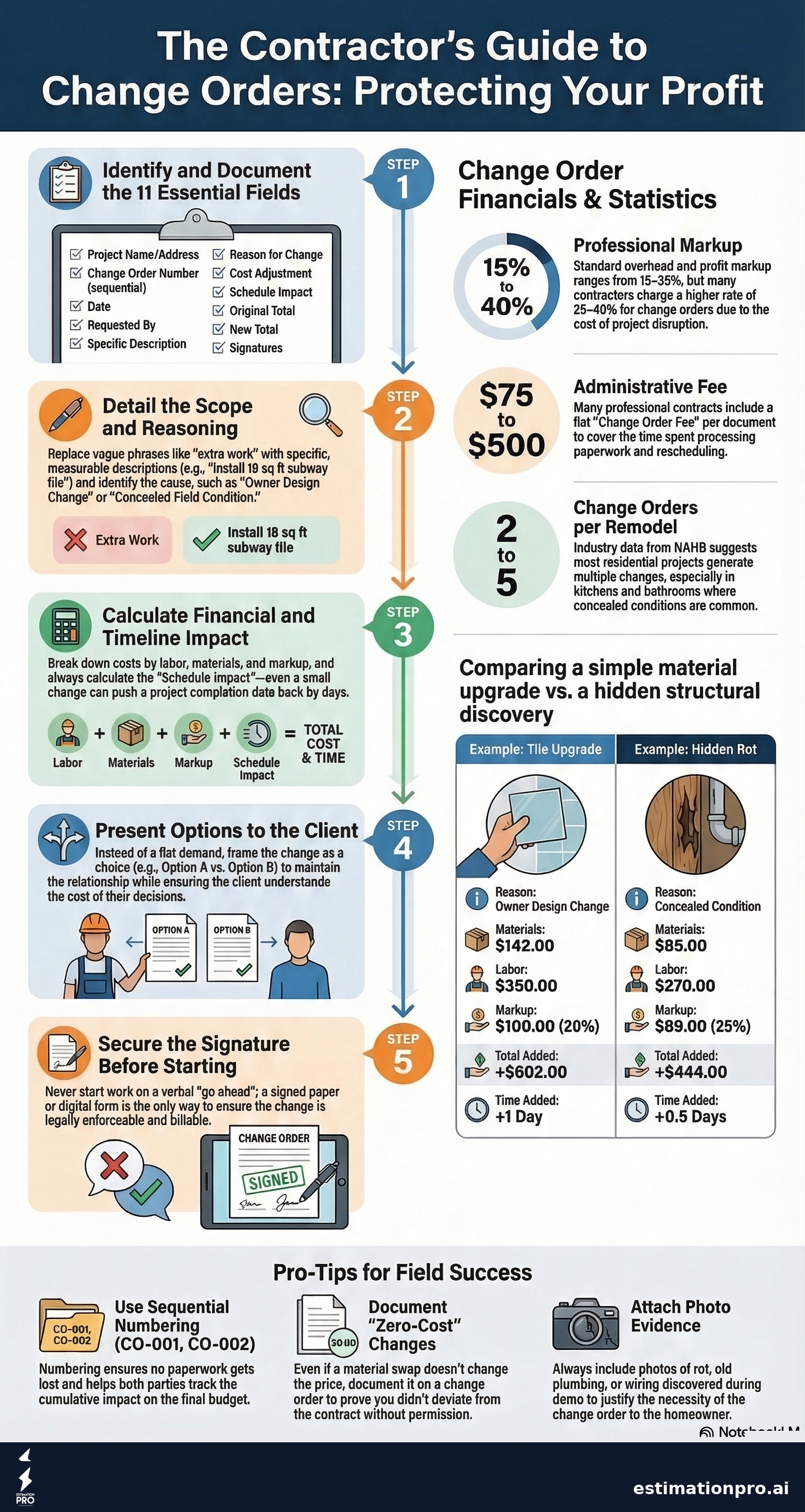
Share This Infographic
Feel free to share this infographic on your website. Just copy the embed code below:
Copy this embed code:
<a href="https://estimationpro.ai/tools/blog/change-order-form-template" target="_blank" rel="noopener">
  <img src="https://estimationpro.ai/tools/blog/infographics/change-order-form-template-infographic.png" alt="change order form template infographic by EstimationPro.AI" style="max-width:100%;height:auto" loading="lazy" />
</a>
<p style="font-size:12px;color:#64748B;margin-top:8px">Source: <a href="https://estimationpro.ai/tools/blog/change-order-form-template">EstimationPro.AI</a></p>
Five Mistakes That Make Change Order Forms Useless
These are the ones I see most often from contractors who end up eating costs they shouldn’t have:
1. Vague descriptions. “Extra work per client request” tells you nothing. What work? What materials? How many hours? If you wouldn’t accept that level of detail on a sub’s invoice, don’t put it on your own change order form.
2. No sequential numbering. When a project has four change orders and none are numbered, you lose track of which ones were approved and which are still pending. Number them. CO-001, CO-002, and so on.
3. Starting work before getting the signature. This is the big one. I’ve done it. Every contractor has done it. The homeowner says “yeah, go ahead” and you pick up the hammer. Then the invoice comes and suddenly they don’t remember agreeing to the extra cost. Get the signature first. Every single time.
4. Missing the schedule impact. A $600 change order that adds zero days to the timeline is different from one that pushes completion back a week. Document the time impact or you’ll be blamed for being “late” on the original schedule.
5. Not updating the running total. Each change order should show the original contract price and the new total. By the third or fourth change, homeowners lose track of how much the project has grown. Keeping a running total prevents sticker shock at the final invoice.
How to Present Change Orders Without Killing the Client Relationship
Handing someone a form that says “you owe more money” is never fun. But it doesn’t have to be confrontational.
I’ve found that framing matters. Don’t say “this is going to cost extra.” Say “here’s what we found, here are your options, and here’s what each option costs.” Give them choices when you can. Option A might be the full fix at $1,200. Option B might be a smaller repair at $600 that addresses the immediate issue. People handle change orders better when they feel like they’re making a decision, not getting hit with a bill.
Timing matters too. Present the change order as soon as you identify it. Waiting until the end of the project to pile up five change orders creates a terrible experience. One at a time, as they come up.
For the markup itself, most contractors charge between 15% and 35% overhead and profit on change order work, according to NAHB builder cost benchmarks. Some contracts allow a higher rate for change orders than for original scope - typically 25% to 40% - because of the disruption cost. Whatever your rate, put it in the contract before the project starts. Nobody should be surprised by the percentage.
What Your Contract Should Say About Change Orders
Your change order form is only as strong as the language in your original contract. Here are the clauses that protect you:
- Change order procedure clause - States that all changes must be documented in writing, signed by both parties, before work begins. No exceptions.
- Markup rate for changes - Specifies whether change order work carries the same markup as original scope or a higher rate.
- Concealed conditions clause - Covers what happens when demo reveals unexpected issues. This is standard in AIA and ConsensusDocs contract forms.
- Change order fee - A flat administrative fee ($75 to $500) for processing each change order, separate from the cost of the work itself. Learn more in our guide on change order fees.
Without these clauses, your change order form is a request. With them, it’s enforceable.
Digital vs. Paper: Which Works Better on a Jobsite
Paper forms work fine for small operations. Print a stack of blank forms, keep them in a clipboard in the truck, and fill them out on-site. Get the signature with a pen. Take a photo of the signed form with your phone as a backup.
Digital forms are faster for contractors running multiple projects. You fill out the form on your phone or tablet, email it for signature, and it’s automatically saved. No lost paperwork, no “I can’t find that change order” conversations. The downside is that some clients, especially older homeowners, prefer paper.
My recommendation: use whatever gets you the signature fastest. A signed paper form beats an unsigned digital one every time.
For contractors who want everything in one place, Try EstimationPro free - it handles the estimate, sends the proposal, tracks change orders, and follows up with clients automatically so you’re not chasing signatures.
When to Use a Change Order vs. a New Contract
Not every scope change warrants a change order. Here’s a general rule:
| Situation | Use This |
|---|---|
| Minor adjustment under $500 | Change order form |
| Material swap, same cost | Change order form (document even if $0 impact) |
| Major scope addition over $5,000 | Consider a contract addendum or supplemental agreement |
| Entirely new phase of work | New contract |
| Owner removes scope (credit) | Change order form with negative cost adjustment |
The threshold varies by project size. On a $150,000 whole-house remodel, a $3,000 change order is routine. On a $12,000 bathroom, the same dollar amount might warrant a more formal addendum.
Frequently Asked Questions
Do I need a change order for zero-cost scope changes?
Yes. Even if the cost impact is $0, document the change. A material swap or design revision that doesn’t affect price still changes the scope, and you want both parties to acknowledge that in writing. Otherwise, the client could claim you deviated from the original agreement.
Can a homeowner refuse to sign a change order?
They can refuse, but you’re not obligated to perform the extra work without approval. If the change is due to a concealed field condition (like rot behind walls), explain why the work is necessary for safety or code compliance. Most homeowners sign once they understand the consequences of skipping the repair. If they still refuse, document the refusal in writing.
How long should I keep completed change order forms?
Keep them for the duration of the project plus at least three years. Many states have statutes of limitation for construction defect claims that run 3-6 years from substantial completion. Your change orders are evidence of what was agreed to and when. Store digital copies even if you work on paper.
Should I include photos with my change orders?
Absolutely. A photo of rot behind a wall or a cracked subfloor speaks louder than any written description. Attach photos directly to the change order or reference a numbered photo log. This is especially important for concealed condition change orders where the homeowner can’t see the issue once it’s repaired.
What’s the average number of change orders per residential remodel?
According to NAHB and RSMeans data, most residential remodels generate 2-5 change orders. Kitchen and bathroom projects trend higher because of concealed conditions behind walls and frequent homeowner design changes. A project with zero change orders is rare. A project with ten or more suggests the original scope wasn’t well-defined.
Get the Free Template
Ready to put this into practice? Use our Change Order Template tool to generate, fill out, and print professional change order forms right from your browser. No signup required.
And when you’re ready to connect your estimates, proposals, change orders, and invoicing into one workflow, Try EstimationPro free. It handles the full cycle from first bid to final payment, with automated follow-up sequences that keep your clients engaged so you win more of the bids you send.
Pricing a job like this?
Get every line item priced for your area in a full estimate
Describe the job or snap a few photos. Send it from EstimationPro and it follows up with your client for you.
3 free estimates in the first 7 days. No credit card.
Get Free Estimating Tips
Enter your email and we'll send you pro tips, cost data, and useful resources for contractors.
We'll send helpful resources and occasional tips. Unsubscribe anytime.
 EstimationPro AI For Contractors, By Contractors
 Professional Estimates That Follow Up for You
Priced line items, a clean PDF or client link, and automatic follow-up once you send it.