

Two hours. That’s how long the average contractor spends building a single estimate from scratch. If you’re bidding three jobs a week, that’s six hours writing quotes instead of swinging a hammer or getting home to your family.
I’ve been there. Sitting at the kitchen table at 9 PM with a calculator, a legal pad, and a pricing spreadsheet trying to get a bathroom bid out before the homeowner calls someone else. That’s why I built EstimationPro, and it’s why I have strong opinions about what a good estimating app should actually do.
Quick Answer: What Makes a Good Estimating App?
A good estimating app for contractors speeds up your bids, reduces missed line items, and helps you win more work. The best ones add automated follow-up and invoicing so you’re not juggling five different tools. Expect $30-$200/month depending on features. Free tools exist, but they usually cost more in missed items and lost time than they save.
Try EstimationPro free to see how a complete estimating platform works from bid to payment.
The Problem Isn’t Typing Speed
Most contractors think they need a faster way to enter numbers. They don’t. The real problem is what happens after the estimate leaves your hands.
Here’s the pattern I see over and over:
- You visit the jobsite, take notes and measurements
- You spend 1-2 hours building the estimate at home
- You email a PDF or hand over a sheet of paper
- The homeowner goes quiet
- You forget to follow up because you’re busy on another job
- They hire whoever responded faster
Homeowners go with whoever quotes first, not necessarily whoever’s best. I’ve lost work to contractors I know do worse quality, simply because they got their price in front of the client 48 hours before I did. That stings, but it’s reality.
How Contractors Estimate Right Now
I talk to contractors every week. Here’s how most are still doing it:
| Method | Who Uses It | Biggest Risk |
|---|---|---|
| Pen and paper | Solo operators, 20+ years in the trade | Missed line items, looks unprofessional |
| Excel or Google Sheets | Small crews, 1-5 employees | Formulas break, no pricing database |
| Basic estimating app | Mid-size contractors | Usually no follow-up, limited proposals |
| Full platform | Growth-focused contractors | Monthly cost, short learning curve |
Most contractors fall into the first two groups. Not because they’re behind, but because nobody built a tool that fits how they actually work. Most estimating software was designed by people who never stood on a jobsite or priced a change order.
Five Things That Actually Matter
After 20-plus years in the trades and building remodeling estimating software from the ground up, here’s what I’d look for:
1. Start Estimates From the Field
Can you build an estimate on your phone while standing in the client’s kitchen? If the app requires a desktop and manual line-by-line entry, it’s already outdated. Same-day estimates win jobs.
2. A Real Pricing Database
Built-in pricing that reflects what materials and labor actually cost in your market right now. Not national averages from three years ago. General laborers run $15-$35/hour depending on your region (BLS Occupational Employment and Wages, 47-2061). Carpenters bill $20-$45/hour (BLS 47-2031). RSMeans publishes similar ranges adjusted by metro area. Your app should know these numbers without you entering them manually every time.
3. Professional Proposals
Homeowners judge your professionalism by your paperwork before they judge your craftsmanship. A clean, branded proposal with your logo, organized line items, and clear payment terms builds trust faster than any sales pitch. I’ve lost jobs early in my career because my estimate looked like a receipt from a gas station. Lesson learned.
4. Automated Follow-Up
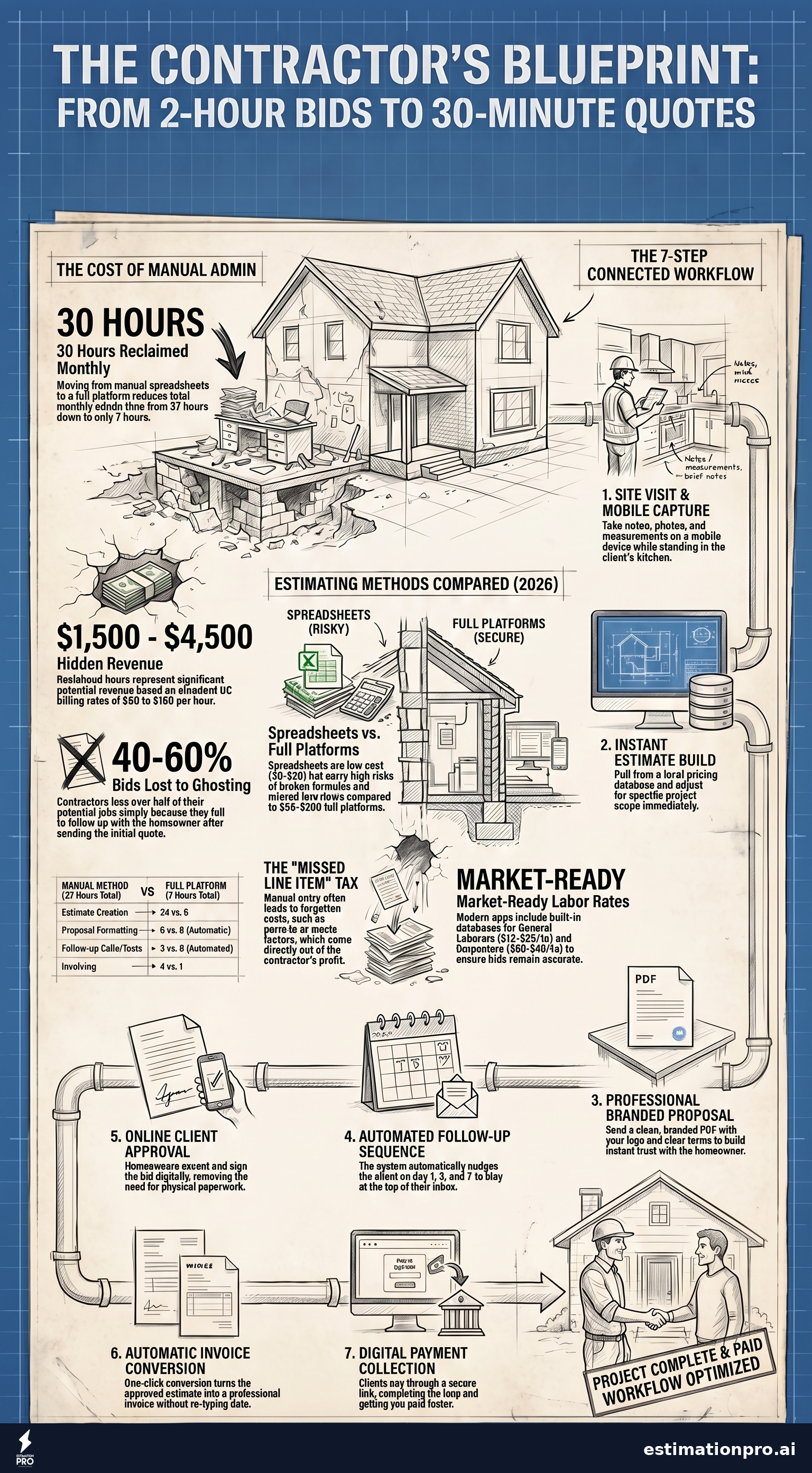
This is the feature most contractors skip, and it’s the one that moves the needle most. Contractors lose 40-60% of bids to ghosting. The homeowner was interested. They just got busy, or your email landed under six other tabs. An estimating app that sends follow-up messages on day 1, day 3, and day 7 will win you work you’d otherwise never hear about again.
5. Invoicing and Payments
If your app turns an approved estimate into an invoice and collects payment, you’ve cut an entire step from your workflow. Separate invoicing software runs $20-$50/month on its own. A platform that handles the full loop - estimate, proposal, follow-up, invoice, payment - saves you both money and time.
Share This Infographic
Feel free to share this infographic on your website. Just copy the embed code below:
Copy this embed code:
<a href="https://estimationpro.ai/tools/blog/estimating-app" target="_blank" rel="noopener">
  <img src="https://estimationpro.ai/tools/blog/infographics/estimating-app-infographic.png" alt="estimating app infographic by EstimationPro.AI" style="max-width:100%;height:auto" loading="lazy" />
</a>
<p style="font-size:12px;color:#64748B;margin-top:8px">Source: <a href="https://estimationpro.ai/tools/blog/estimating-app">EstimationPro.AI</a></p>
Time Savings: A Real Example
Say you bid 12 jobs a month. Here’s how the hours break down:
Manual method (spreadsheet, email, separate invoicing):
- Estimate creation: 2 hrs × 12 = 24 hours/month
- Proposal formatting: 30 min × 12 = 6 hours/month
- Follow-up calls and texts: 15 min × 12 = 3 hours/month
- Invoicing: 20 min × 12 = 4 hours/month
- Total: 37 hours/month on admin
With a full estimating platform:
- Estimate creation: 30 min × 12 = 6 hours/month
- Proposal generation: automatic = 0 hours
- Follow-up: automated = 0 hours
- Invoicing: 5 min × 12 = 1 hour/month
- Total: 7 hours/month on admin
That’s 30 hours back every month. At a GC billing rate of $50-$150/hour (HomeGuide 2026 contractor rate data), those hours represent $1,500 to $4,500 in potential revenue you’re leaving on the table doing paperwork instead of billable work.
The Missed Line Item Problem
Here’s one that still bothers me. I was bidding a bathroom remodel years ago and forgot to include the subfloor replacement. Water damage had rotted it out, and I knew it needed replacing. But I was rushing through the estimate at 10 PM and skipped right past it. That $1,200 came straight out of my profit.
A good estimating app uses templates and checklists that prompt you for common items by project type. Subfloor. Plumbing rough-in. Electrical. Permits. Dumpster rental. Waste factor on materials. You shouldn’t have to remember every line item from memory when you’re exhausted at the end of a long day. The app should catch what your brain misses.
If you want a deeper look at how to estimate remodeling projects accurately, check out our guide on how to estimate remodeling jobs.
What to Skip When Shopping for Software
Not every estimating app deserves your money. Red flags:
- Desktop-only software. If you can’t use it from your phone at the jobsite, you’ll never send same-day estimates. You’ll keep putting it off until you get home, and by then the homeowner has three other bids.
- Enterprise pricing. Apps that cost $500/month and require a demo call were built for large commercial GCs with office staff, not a residential remodeler running a 3-person crew.
- Per-estimate fees. Some apps charge per quote or per client. That punishes you for bidding more work. Look for flat monthly pricing.
- No mobile access. This should be obvious in 2026, but some tools still treat mobile as an afterthought with a stripped-down interface that can’t do half of what the desktop version does.
- No follow-up automation. If the app only handles estimates and stops there, you’re still leaving the biggest gap in your workflow wide open.
The Connected Workflow
The real win isn’t just faster estimates. It’s a single system that takes a lead from first contact to final payment without you bouncing between six different tools:
- Site visit - take notes, photos, and measurements on your phone
- Build the estimate - pull from your pricing database, adjust for the scope
- Send the proposal - professional, branded, one click
- Auto follow-up - the system nudges the homeowner on your schedule
- Client approval - they accept and sign online
- Invoice - the estimate converts to an invoice automatically
- Get paid - the client pays through the link
Estimate to proposal to follow-up to invoice to paid. No spreadsheets. No forgotten follow-ups. No chasing paper checks.
Frequently Asked Questions
Is a free estimating app worth using?
Free apps handle simple jobs but lack pricing databases, professional templates, and follow-up automation. If you bid more than 5 jobs a month, a paid app at $30-$80/month pays for itself in the first week through time savings alone. Think of it this way: one recovered bid from automated follow-up covers an entire year of subscription costs.
Can I use an estimating app from my phone?
Yes, and you should. The best ones work on iOS, Android, and desktop. Starting an estimate on-site and sending it before you leave the driveway puts you ahead of every competitor still writing bids at their kitchen table after dinner.
How long does it take to learn a new estimating app?
Most contractors are comfortable within a day. Good apps include pre-built templates for common project types like kitchen remodels, bathroom remodels, painting, and flooring, so you’re not building everything from scratch. If the app takes more than an afternoon to figure out, it wasn’t designed for contractors.
What’s the difference between an estimating app and project management software?
Estimating apps focus on creating accurate bids fast. Project management tools handle scheduling, task tracking, and crew coordination after the job is won. Some platforms combine both, but dedicated estimating tools typically produce better, more detailed quotes than a general project management suite trying to do everything.
Should I just build my own spreadsheet template?
You can, and many contractors do. But spreadsheets don’t auto-generate proposals, don’t send follow-ups, don’t track which clients opened your bid, and don’t collect payments. If you’re doing more than a handful of estimates a month, you’ll outgrow a spreadsheet fast. The hours you spend maintaining formulas and formatting PDFs could be spent on actual work.
All pricing in this article reflects 2026 national averages. Prices vary by region, market conditions, and project complexity. Get local quotes before budgeting any project.
Contractors using EstimationPro cut their estimating time from hours to minutes and close more bids with automated follow-up sequences. Try EstimationPro free - it handles the full workflow from estimate to proposal to follow-up to invoice to payment, so you spend less time on paperwork and more time building.
Pricing a job like this?
Get every line item priced for your area in a full estimate
Describe the job or snap a few photos. Send it from EstimationPro and it follows up with your client for you.
3 free estimates in the first 7 days. No credit card.
Estimating Methods Compared
- Full manual data entry
- No built-in pricing database
- Limited proposal formatting
- No follow-up automation
- Pre-built estimate templates
- Material cost databases
- PDF proposal generation
- Basic contact management
- AI-assisted line items
- Branded proposals
- Automated follow-up sequences
- Invoicing and payments
- Client portal access
Get Free Estimating Tips
Enter your email and we'll send you pro tips, cost data, and useful resources for contractors.
We'll send helpful resources and occasional tips. Unsubscribe anytime.
 EstimationPro AI For Contractors, By Contractors
 Save 2+ Hours on Every Estimate
Upload photos, record voice notes, and get AI-powered estimates with line items, material lists, and regional pricing.