

I lost a $38,000 kitchen remodel last year because I took three days to send the estimate. The homeowner told me straight up: “We went with the other guy because he got back to us the same afternoon.” Not because his price was better. Not because his work was better. He was just faster.
That’s when I stopped using my old spreadsheet system and started looking at what free construction cost estimating software was actually available. Here’s what I found after testing the options that matter.
Quick Answer
Free construction cost estimating software ranges from basic spreadsheet templates to full platforms with limited free tiers. The best free options include pre-built cost databases, professional output formatting, and at least basic proposal generation. Most free tiers limit you to 3-5 projects per month, which works for smaller operations but not for contractors bidding 10+ jobs weekly. For serious estimating with automated follow-up and invoicing, expect to pay $29-$149/month.
Try EstimationPro free to build detailed, line-item estimates with professional proposals and automated follow-up, all from your phone or laptop.
What “Free” Actually Means for Estimating Software
Let’s be honest about what you get for nothing. Free estimating software falls into three categories, and they’re not created equal.
Spreadsheet templates are the most common. You download an Excel or Google Sheets file with columns for materials, labor, quantities, and totals. They work. I used spreadsheets for years. But they have real limits: no built-in cost database, no professional output for clients, and zero automation. Every bid is manual from scratch.
Free tiers of paid software give you access to real estimating tools but with restrictions. Usually it’s a cap on the number of estimates per month, limited features, or watermarked proposals. This is where the most value sits for contractors who want to test before committing.
Open-source tools exist but they’re built for developers, not contractors. If you’re comfortable with GitHub and command lines, more power to you. For the rest of us, they’re not practical.
Side-by-Side Comparison: What You Get at Each Level
| Feature | Spreadsheet (Free) | Free Software Tier | Paid Software |
|---|---|---|---|
| Cost database | No, manual entry | Yes, limited | Yes, full |
| Professional proposals | No | Basic | Fully branded |
| Line-item detail | Manual setup | Built-in | Built-in |
| Client-facing output | Looks like a spreadsheet | Clean PDF/link | Polished proposals |
| Follow-up automation | None | None or basic | Full sequences |
| Invoicing | Separate tool needed | Sometimes included | Integrated |
| Time per estimate | 2-4 hours | 30-60 minutes | 15-45 minutes |
| Mobile access | Limited | Yes | Yes |
| Learning curve | Low if you know Excel | Medium | Medium |
Prices vary by region. All figures in this post reflect 2026 national averages, with major metros running 20-40% above these numbers.
The time column is the one that matters most. At a general contractor billing rate of $50-$150/hour (source: HomeGuide 2026, BLS supervisor wage data), every hour spent on estimates instead of billable work costs you real money.
The Real Cost of “Free” Estimating
Here’s math that changed how I think about estimating tools.
Example 1: Solo contractor bidding 8 jobs per month
Using spreadsheets at 3 hours per estimate:
- 8 jobs x 3 hours = 24 hours/month on estimates
- At a $90/hour billing rate, that’s $2,160 in lost billable time
- Close rate on spreadsheet bids: roughly 25-30%
Using estimating software at 45 minutes per estimate:
- 8 jobs x 0.75 hours = 6 hours/month on estimates
- Lost billable time: $540/month
- Close rate with professional proposals: typically 35-45%
The difference: $1,620/month in recovered time, plus higher close rates from professional-looking bids. Even a $99/month subscription pays for itself five times over.
Example 2: Small crew bidding 15 jobs per month
Using spreadsheets: 15 x 3 hours = 45 hours/month = $4,050 in lost time Using software: 15 x 0.75 hours = 11.25 hours/month = $1,013 in lost time
Savings: $3,037/month before counting the higher win rate. According to NAHB’s 2024 builder survey data, contractors using estimating software report 15-20% higher bid-to-win ratios than those using manual methods.
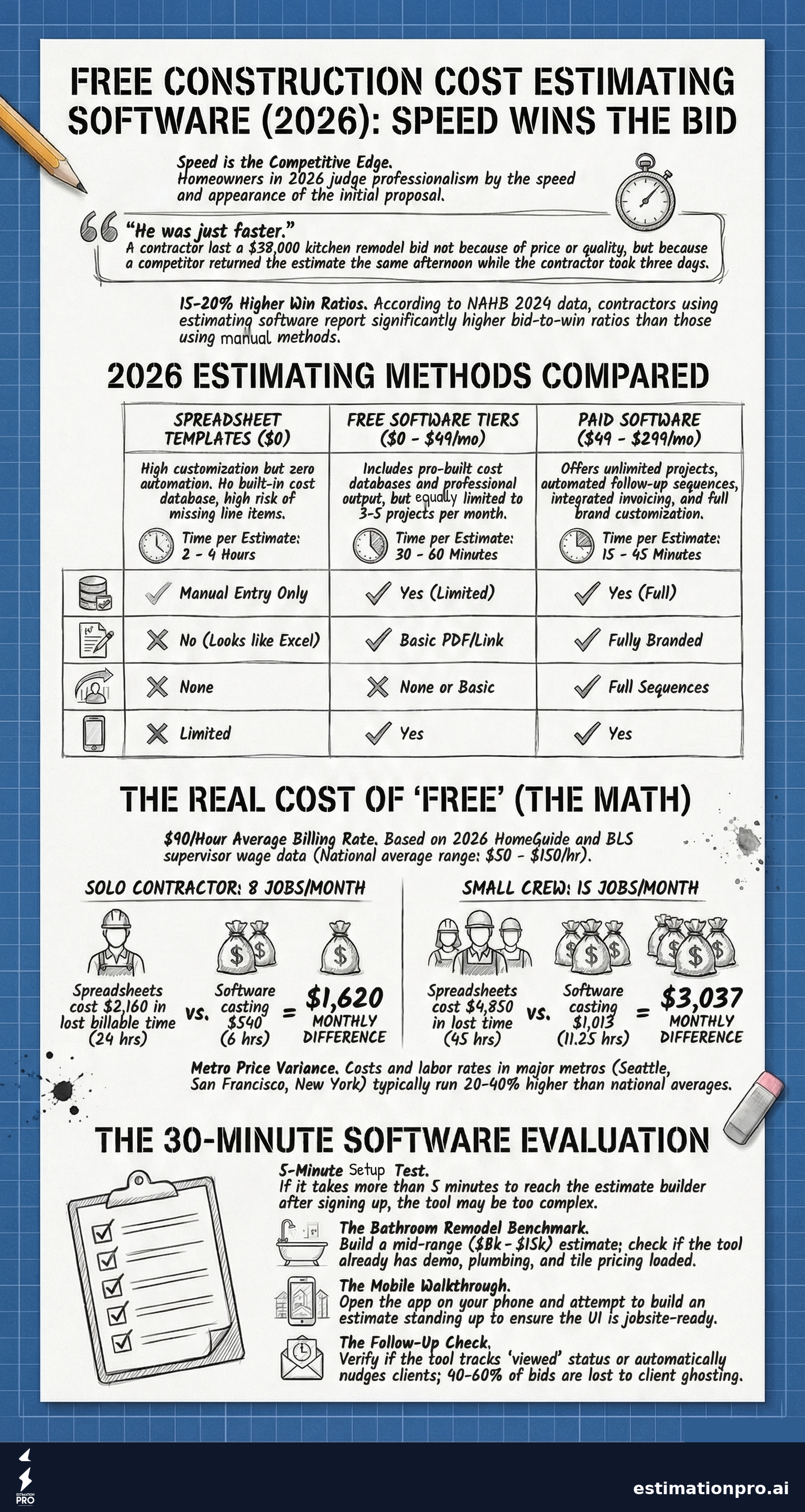
Share This Infographic
Feel free to share this infographic on your website. Just copy the embed code below:
Copy this embed code:
<a href="https://estimationpro.ai/tools/blog/free-construction-cost-estimating-software" target="_blank" rel="noopener">
  <img src="https://estimationpro.ai/tools/blog/infographics/free-construction-cost-estimating-software-infographic.png" alt="free construction cost estimating software infographic by EstimationPro.AI" style="max-width:100%;height:auto" loading="lazy" />
</a>
<p style="font-size:12px;color:#64748B;margin-top:8px">Source: <a href="https://estimationpro.ai/tools/blog/free-construction-cost-estimating-software">EstimationPro.AI</a></p>
What to Look For Before You Download Anything
Not all estimating tools solve the same problems. Before you sign up for the first free option you find, ask these questions:
Does it have a cost database? A tool that makes you enter every price from scratch isn’t saving you much time over a spreadsheet. The best estimating software comes with regional pricing data already loaded, so you’re adjusting numbers instead of researching them. Typical contractor markup runs 10-50% on materials and subs (industry standard, verified by field experience), and good software helps you apply that consistently.
Can it produce client-ready output? Your estimate is your first impression. I’ve seen contractors lose work because their bid showed up as a messy Excel attachment with broken formatting. Homeowners judge your professionalism before you ever pick up a hammer. A clean, branded proposal tells them you run a real operation.
Does it handle the full workflow? Estimating is step one. You also need to send proposals, follow up when clients ghost you (and they will), invoice approved work, and collect payment. If your free estimating tool stops at the estimate, you’re still juggling three or four other systems. That’s where the real time drain lives.
Will it work on your phone? You’re on the jobsite, not at a desk. If the software doesn’t work on mobile, it doesn’t work for contractors. Period.
When Spreadsheets Still Make Sense
I’m not going to pretend spreadsheets are useless. They’re not.
If you’re a solo operator doing fewer than 4 bids a month, a well-built spreadsheet template can work fine. You know your prices. You know your labor rates. The volume is low enough that manual entry isn’t killing your productivity.
The breakpoint is around 5-6 bids per month. Past that, the time you spend formatting, double-checking formulas, and retyping line items starts eating into your actual work. That’s when software earns its keep.
If you want to compare the spreadsheet-to-software transition in detail, I wrote a full breakdown on contractor estimating spreadsheets vs. software that covers the real tradeoffs.
Five Mistakes Contractors Make Picking Estimating Software
1. Choosing based on features they’ll never use. Enterprise tools with 200 features look impressive in a demo. Then you use 12 of them and pay for the other 188. Match the tool to your actual workflow, not your fantasy workflow.
2. Ignoring the follow-up problem. Most contractors lose 40-60% of sent bids to ghosting. The estimate goes out, the homeowner goes quiet, and the contractor moves on. The real money isn’t in faster estimates. It’s in following up on the ones you already sent. Any software that stops at “estimate created” is only solving half the problem.
3. Not testing with a real job. Free trials exist for a reason. Don’t evaluate software with a fake project. Run an actual bid through it. Time yourself. Compare the output to what you’ve been sending. That’s the only honest test.
4. Skipping the mobile test. Open the app on your phone. Try to build an estimate standing up, the way you’d do it on a walkthrough. If the buttons are tiny and the workflow is clunky, move on.
5. Forgetting about getting paid. The best estimating workflow goes estimate, proposal, follow-up, invoice, payment. If your estimating tool can’t connect to invoicing and payment collection, you’re adding manual steps back into the process. That defeats the purpose.
How I’d Evaluate a Free Estimating Tool in 30 Minutes
Here’s my actual testing process. Takes half an hour.
- Sign up. Time how long it takes to get to the estimate builder. If it’s more than 5 minutes of setup, that’s a flag.
- Build a bathroom remodel estimate. Include demo, plumbing, tile, vanity, fixtures, and labor. A mid-range bathroom remodel runs $8,000-$15,000 in most markets (RSMeans residential data, adjusted regionally). See how many of those items the tool already has priced.
- Generate a proposal. Send it to yourself. Open it on your phone. Does it look professional? Would you be proud to send it to a client?
- Check if it tracks sent estimates. Can you see which proposals are pending, viewed, or approved? If not, you’re flying blind on your pipeline.
- Look for follow-up features. Does the tool remind you (or automatically nudge the client) when a bid goes cold? This is the feature that separates hobby tools from business tools.
If you want to run this test right now, our construction cost estimator gives you a quick feel for AI-powered estimating with pre-loaded pricing data.
Pricing Disclaimer
All cost figures in this post reflect national averages. Prices vary by region, with labor rates in major metros like Seattle, San Francisco, and New York running 20-40% higher than rural markets. Always verify pricing against your local market conditions before bidding work.
Frequently Asked Questions
Is free construction estimating software accurate enough for real bids?
Free software with a built-in cost database is usually accurate within 10-15% for standard residential work. The accuracy depends on how current the pricing data is and whether it accounts for regional differences. Always cross-check critical numbers against your own field experience and local supplier quotes. No software replaces knowing your market.
Can I use Google Sheets as construction estimating software?
Yes, and many contractors do. Google Sheets works for basic cost tracking and simple estimates. The main downsides are no built-in pricing data, no professional proposal output, and no automation. You can build a functional estimating spreadsheet, but you’ll spend more time per bid and your output won’t look as polished to clients. For a ready-made option, check our construction estimate template.
What’s the difference between estimating software and takeoff software?
Estimating software calculates costs, materials, and labor for a project. Takeoff software measures quantities from blueprints and plans. Some tools combine both. If you’re a residential remodeler working from site visits rather than architectural plans, you need estimating software, not takeoff software. I wrote more about this in my post on how to estimate a construction job.
How many free estimates do most software trials include?
Most free tiers allow 3-5 estimates per month. Some limit you to one active project at a time. A few offer unlimited estimates but restrict features like proposal customization, follow-up automation, or remove their branding from outputs. Read the limits carefully before committing your workflow to a platform.
Is it worth paying for estimating software as a solo contractor?
If you’re bidding more than 5 jobs per month, almost always yes. The time savings alone typically cover the subscription cost within the first week. At a contractor billing rate of $50-$150/hour (BLS data for construction supervisors), saving even 10 hours per month on estimating work pays for most subscriptions several times over. The higher close rate from professional proposals is the bonus on top.
Stop Estimating in a Vacuum
The fastest way to lose a job isn’t pricing too high. It’s pricing too slow.
Free estimating software gets you started, and starting is better than spending another evening hunched over a spreadsheet. But the contractors who consistently win work aren’t just estimating faster. They’re sending professional proposals, following up automatically when bids go quiet, and invoicing the same day the work gets approved.
EstimationPro handles the full cycle: estimate, proposal, automated follow-up, invoice, payment. You build the estimate, and the system handles the rest so you’re not chasing clients or losing bids to silence. Try EstimationPro free and run a real job through it. That’s the only way to know if it fits how you work.
Pricing a job like this?
Get every line item priced for your area in a full estimate
Describe the job or snap a few photos. Send it from EstimationPro and it follows up with your client for you.
3 free estimates in the first 7 days. No credit card.
Free Estimating Methods Compared
- Fully customizable layout
- No learning curve if you know Excel
- No automation or follow-up
- Easy to miss line items
- Looks unprofessional to clients
- Pre-built cost databases
- Professional proposal output
- Some automation features
- Limited projects per month
- Faster than spreadsheets
- Unlimited projects
- Automated follow-up sequences
- Invoicing and payments
- Full proposal customization
- Priority support and training
Get Free Estimating Tips
Enter your email and we'll send you pro tips, cost data, and useful resources for contractors.
We'll send helpful resources and occasional tips. Unsubscribe anytime.
 EstimationPro AI For Contractors, By Contractors
 Professional Estimates That Follow Up for You
Priced line items, a clean PDF or client link, and automatic follow-up once you send it.