

I’ve wasted more hours in spreadsheets than I’d ever admit. Typing the same line items over and over, copy-pasting material lists, formatting bids in Word at 10 PM when I should be home with my family. For years that was just how it worked. You quoted jobs the hard way because there wasn’t a better option.
That’s changed. There are real tools now that cut estimating time from hours to minutes, and some of them are actually built by people who’ve swung a hammer. But here’s the problem: there are also dozens of bloated platforms designed for enterprise GCs that will charge you $400/month and overwhelm you with features you’ll never touch.
So I tested the options and put together an honest breakdown of the 7 best estimating software tools for contractors in 2026. No affiliate links, no fluff. Just what works, what doesn’t, and what’s worth your money.
Try EstimationPro free to see how fast AI-powered estimating can be, or keep reading for the full comparison.
Quick Answer
The best estimating software depends on your crew size and project type. For residential remodelers and small contractors, EstimationPro ($29/mo) offers the fastest quoting with AI-powered estimates from photos, notes, and audio, plus automated follow-up that wins back ghosted bids. For commercial contractors working from blueprints, STACK ($250/mo) handles digital takeoffs well. Buildertrend ($399/mo) works for larger residential GCs who need full project management bundled in, but it’s overkill for most crews under 10 people.
Side-by-Side Comparison
| Software | Starting Price | Best For | Estimating Method | Follow-Up Built In? |
|---|---|---|---|---|
| EstimationPro | $29/mo | Residential remodelers, small crews | AI from photos/notes/audio | Yes - automated sequences |
| Clear Estimates | $59/mo | Small residential shops | Template-based, 15K preloaded items | No |
| Jobber | $39/mo | Home services (HVAC, plumbing) | Manual line items | Basic reminders |
| CoConstruct | ~$99/mo | Custom home builders | Manual with selection tracking | No |
| STACK | ~$250/mo | Commercial subs and GCs | Digital takeoff from plans | No |
| Buildertrend | $399/mo | Large residential GCs ($2M+) | Manual with templates | Basic reminders |
| ProEst | ~$5,000/yr | Enterprise commercial | Costbook + takeoff | No |
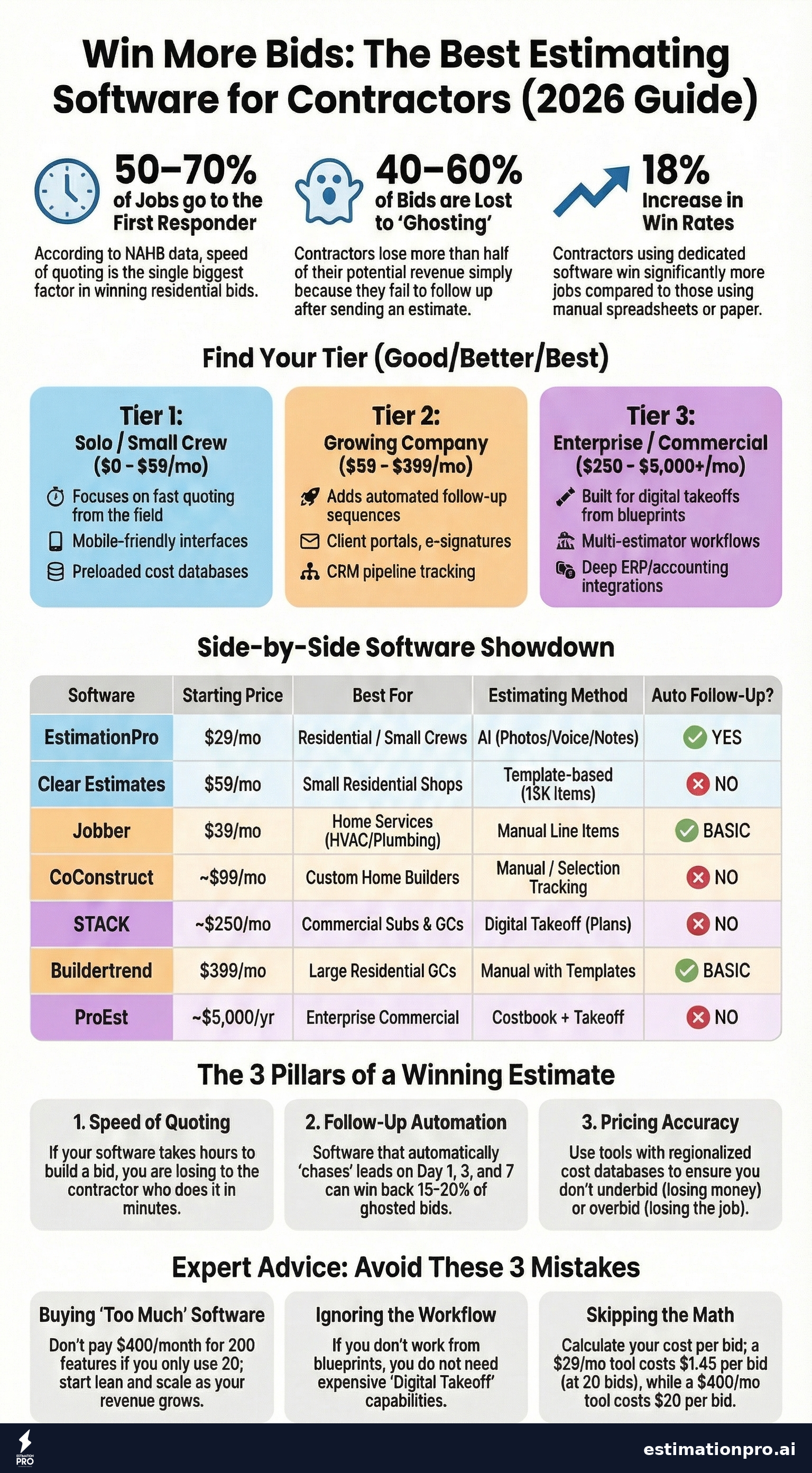
Share This Infographic
Feel free to share this infographic on your website. Just copy the embed code below:
Copy this embed code:
<a href="https://estimationpro.ai/tools/blog/best-estimating-software-for-contractors" target="_blank" rel="noopener">
  <img src="https://estimationpro.ai/tools/blog/infographics/best-estimating-software-for-contractors-infographic.png" alt="Best estimating software for contractors infographic by EstimationPro.AI" style="max-width:100%;height:auto" loading="lazy" />
</a>
<p style="font-size:12px;color:#64748B;margin-top:8px">Source: <a href="https://estimationpro.ai/tools/blog/best-estimating-software-for-contractors">EstimationPro.AI</a></p>
1. EstimationPro - Best for Residential Remodelers
Price: Starts at $29/month Best for: Residential remodelers, kitchen/bath contractors, small-to-mid crews
I built EstimationPro because every other tool on this list requires you to sit down and manually type in line items. That’s the part I hated. You’re on-site, the homeowner is standing right there, and you’re thinking about all the items you need to remember to include when you get back to the office.
EstimationPro takes photos, voice notes, and written notes from the job site and generates a detailed, line-item estimate in minutes. Not a ballpark. A real estimate with materials, labor, quantities, and pricing pulled from a verified cost database covering 385 items across 32 trades.
What sets it apart:
- AI-generated estimates from job site photos and notes
- Professional proposals with your branding
- Automated follow-up sequences that chase down leads so you don’t have to. Contractors lose 40-60% of bids because the homeowner just goes quiet. EstimationPro sends timed follow-ups on day 1, day 3, and day 7 automatically
- Invoicing and payment collection through Stripe
- Full workflow: estimate, proposal, follow-up, invoice, paid
Limitations: Focused on residential work. If you’re bidding $5M commercial projects from architectural drawings, this isn’t the right fit.
Use our Garage Cost Calculator to see the kind of detailed breakdowns EstimationPro generates, try the Markup Calculator to dial in your margins, or check our Construction Proposal Template to see what a professional proposal looks like.
2. Clear Estimates - Best Budget Option for Small Shops
Price: $59/month flat (no contract) Best for: Solo contractors and 2-3 person crews doing residential work under $5M/year
Clear Estimates keeps things simple. You pick from 60+ job templates (kitchen remodel, bathroom remodel, deck build, etc.), adjust the quantities, and it generates an estimate using preloaded pricing for 400+ U.S. markets.
Strengths:
- 15,000 preloaded parts with regional pricing
- Templates get you started fast
- QuickBooks integration
- No contract, cancel anytime
Weaknesses:
- No mobile app. You’re doing everything from a laptop
- Limited customization options
- No follow-up automation at all
- Basic reporting
If you’re a one-person shop and you just need something better than a spreadsheet, Clear Estimates works. But you’ll outgrow it fast once you start sending more than a handful of bids per month.
3. Jobber - Best for Home Service Companies (Not GCs)
Price: $39/month (1 user) to $599/month (15 users) Best for: HVAC techs, plumbers, landscapers, cleaning companies
Jobber gets mentioned in every “best contractor software” list, but here’s what most of those lists don’t tell you: Jobber is not built for construction estimating. It’s a field service management tool. Great for scheduling HVAC calls and dispatching plumbers. Not great for building a detailed kitchen remodel estimate.
Strengths:
- Client Hub where customers approve quotes and pay online
- AI receptionist answers calls 24/7
- Solid scheduling and dispatching
- Good mobile app
Weaknesses:
- No cost database or takeoff capability
- Per-user pricing gets expensive. A 5-person crew at the Plus tier is paying real money
- Add-on upselling (AI receptionist, marketing suite) inflates the real cost by $275+/month
- Not designed for line-item construction estimates
If you run a service company, Jobber is solid. If you’re a remodeling contractor, it’s the wrong tool.
4. CoConstruct - Best for Custom Home Builders (But Risky)
Price: Starts around $99/month Best for: Custom home builders doing 5-50 homes per year
CoConstruct’s standout feature is client selections management. When a homeowner needs to choose between 14 different cabinet finishes, 8 countertop materials, and 6 hardware styles, CoConstruct tracks every decision and rolls the pricing impact into the estimate automatically. That’s genuinely useful for custom builds.
The risk: Buildertrend acquired CoConstruct in 2021, and since then, feature development has stalled. Support has dropped off. Users report being pushed to migrate to Buildertrend. According to reviews on G2, the platform feels like it’s on borrowed time.
Strengths:
- Selection tracking is best-in-class
- Change order workflow with client approval
- Client and subcontractor portals
Weaknesses:
- Post-acquisition uncertainty (Buildertrend ownership)
- Prices reportedly jumped significantly after the acquisition
- Minimal updates since 2021
- Long-term viability is a question mark
I’d be cautious about building your business workflow around a platform that might get sunset.
5. STACK - Best for Commercial Takeoffs
Price: ~$250/month ($2,999/year, 1 user) Best for: Commercial subcontractors and GCs with dedicated estimating staff
STACK is the go-to for contractors who bid from blueprints. Upload your plans, use AI-assisted digital takeoff to measure quantities, and apply costs from a 23,000+ item database. It’s cloud-based, so your field team and office team can collaborate on the same set of plans.
Strengths:
- AI-assisted digital takeoff saves hours on plan review
- 23,000+ item pre-built cost database
- Cloud collaboration between field and office
- Free limited version available to try
Weaknesses:
- Annual commitment required
- Estimating only. You need a separate tool for project management, invoicing, and everything else
- Overkill for residential contractors who don’t work from formal drawings. If your “plans” are a napkin sketch and some photos, STACK isn’t for you
- Per-user pricing adds up for teams
6. Buildertrend - Best All-in-One for Large Residential GCs
Price: $399/month (Essential) to $1,099/month (Complete) Best for: Established residential GCs doing $2M+ annually with 10+ employees
Buildertrend tries to do everything: estimating, scheduling, project management, client portal, time tracking, selections, warranty tracking. And honestly, it does most of it reasonably well. The problem is the price and the learning curve.
Strengths:
- True all-in-one platform (pre-sale through warranty)
- No per-user fees, unlimited projects
- Client portal and selection tools
- Real-time scheduling
Weaknesses:
- $399/month minimum is steep for a 3-person crew
- Feature bloat. Most users report only using 20-30% of the features, according to Capterra reviews
- Slow load times and occasional bugs reported on G2
- Steep learning curve for the full platform
If you’re running 15+ projects simultaneously with a team of 10+, Buildertrend makes sense. For everyone else, you’re paying for a lot of software you won’t use.
7. ProEst - Best for Enterprise Commercial GCs
Price: Starts around $5,000/year (sales call required) Best for: Mid-to-large commercial GCs with dedicated estimating departments
ProEst is now owned by Autodesk, which tells you the target market. This is enterprise-grade estimating with deep integrations into Procore, Sage 300, and Autodesk’s own ecosystem. It has a 23,000+ line regionalized Costbook, CRM functionality, digital takeoff, and bid-day analysis tools.
Strengths:
- Deep Costbook with regionalized data
- CRM + estimating + takeoff in one platform
- Procore and Sage integrations
- Bid-day analysis and reporting
Weaknesses:
- No transparent pricing. You have to sit through a sales call
- Steep learning curve
- Way too much for residential contractors or small crews
- Moving to Annual Construction Volume pricing in 2026, which could mean price increases
Unless you’re bidding $1M+ commercial projects regularly, ProEst isn’t worth looking at.
What Actually Matters When Choosing
Forget the feature comparison charts with 47 checkboxes. Here’s what actually moves the needle for most contractors:
Speed of quoting. The contractor who responds first wins 50-70% of the time, according to NAHB data. If your software slows you down, it’s costing you jobs. I’ve lost work because I took two days to put together a bid that another contractor quoted in two hours.
Follow-up automation. This is the one most contractors overlook. You send 10 bids this month. Three say yes immediately. Two say no. Five just… disappear. Those five ghosted bids represent thousands in potential revenue. Software that automatically follows up on those bids wins back 15-20% of them.
Pricing accuracy. A tool is only as good as its cost data. Outdated pricing leads to underbidding (you lose money) or overbidding (you lose the job). Look for regional pricing databases that get updated regularly.
What you DON’T need: Most contractors under 20 employees don’t need full project management software bundled with their estimating tool. Scheduling, time tracking, and document management are nice, but they’re not the thing that makes or breaks your bidding.
Mistakes I See Contractors Make with Estimating Software
-
Buying enterprise software for a 3-person crew. A $400/month platform with 200 features makes sense at $3M in revenue. At $300K, it’s an expense you can’t justify. Start lean.
-
Ignoring the follow-up problem. The estimate is only half the battle. If you send a bid and never follow up, your close rate will stay under 30%. Any tool without automated follow-up is leaving money on the table.
-
Choosing based on features instead of workflow. The tool with the longest feature list isn’t the best tool. The best tool is the one that matches how you actually work. If you never read blueprints, you don’t need digital takeoff.
-
Not calculating the real cost per bid. If your software costs $400/month and you send 20 estimates, that’s $20 per estimate. If a $29/month tool gets the same job done, you’re spending $1.45 per estimate. Over a year, that’s $4,452 in savings. That math matters.
-
Skipping the trial. Every tool on this list offers a free trial or demo. Use it. Send a real estimate through the system before committing. See how it handles your actual workflow, not a canned demo scenario.
Frequently Asked Questions
What is the best free estimating software for contractors?
Most free options are extremely limited. STACK offers a free tier with basic takeoff capabilities, and EstimationPro offers a free trial that includes full functionality. For contractors doing fewer than 5 bids per month, a spreadsheet template can work, but you’ll spend 2-3x longer per estimate compared to dedicated software, and you won’t have follow-up automation or professional proposals.
How much should I spend on estimating software?
A good rule of thumb is 1-2% of your annual revenue. If you’re doing $500K/year, $50-80/month is reasonable. According to a 2024 FMI survey, contractors using dedicated estimating software reported winning 12-18% more bids compared to manual methods, mainly due to faster response times. The software should pay for itself within the first month or two through won jobs.
Can estimating software replace a professional estimator?
No. Software speeds up the process and reduces errors, but you still need construction knowledge to review and adjust estimates. No tool can account for that rotted subfloor you’ll find when you pull up the vinyl, or the homeowner who changes their mind three times during the project. The software handles the math and the formatting. You handle the judgment calls.
What’s the difference between estimating software and project management software?
Estimating software helps you price and bid jobs. Project management software helps you run them after you win them. Some platforms (Buildertrend, CoConstruct) bundle both. Others (EstimationPro, Clear Estimates, STACK) focus on the estimating and bidding side. For most small contractors, starting with a dedicated estimating tool and adding PM later makes more sense than buying an all-in-one from day one.
Note: All software pricing shown reflects published rates as of April 2026. Prices vary by region, plan tier, and promotional offers. Verify current pricing directly with each vendor before committing.
Do I need digital takeoff capabilities?
Only if you regularly bid from architectural drawings and blueprints. Most residential remodelers work from site visits, photos, and measurements, not formal plans. Digital takeoff tools like STACK and ProEst are built for commercial work where you’re measuring quantities from scaled drawings. If your projects start with a photo and a conversation with the homeowner, you need AI-powered estimating, not takeoff software.
Contractors on Capterra rate EstimationPro 4.8/5 for speed and ease of use. Try EstimationPro free - it builds the estimate, sends a professional proposal, and follows up with the homeowner automatically so you win more of the bids you already send.
Estimating Software by Contractor Size
- Fast quoting from the field
- Preloaded cost databases
- Simple proposal generation
- Mobile-friendly interface
- Automated follow-up sequences
- Client portals and e-signatures
- Invoicing and payment collection
- Team collaboration tools
- CRM and pipeline tracking
- Digital takeoff from blueprints
- Multi-estimator workflows
- ERP and accounting integrations
- Bid-day analysis and reporting
Get Free Estimating Tips
Enter your email and we'll send you pro tips, cost data, and useful resources for contractors.
We'll send helpful resources and occasional tips. Unsubscribe anytime.
 EstimationPro AI For Contractors, By Contractors
 Win More Jobs With Professional Estimates
Polished proposals that make clients say yes. Built in seconds, not hours.