
I’ve lost count of how many jobs I won just because my estimate looked professional and the other guy’s didn’t.
Not better pricing. Not better marketing. Just a clean, detailed estimate that showed the homeowner exactly what they were paying for. The other contractor? Lump sum on a piece of paper. No breakdown. No follow-up call. Nothing.
That’s the difference between amateur and pro-level estimating. And it’s costing contractors thousands of dollars every month.
Quick Answer: What Makes a Contractor Estimate “Pro”?
A contractor estimate pro setup means detailed line-item accuracy, professional formatting, same-day turnaround, and an automated follow-up system that keeps homeowners engaged after you send the bid. The estimate is your first impression. Most contractors treat it like paperwork. The ones who treat it like a sales tool close more work.
Try EstimationPro free to build professional, line-item estimates in minutes and automatically follow up with every lead.
Share This Infographic
Feel free to share this infographic on your website. Just copy the embed code below:
Copy this embed code:
<a href="https://estimationpro.ai/tools/blog/contractor-estimate-pro" target="_blank" rel="noopener">
  <img src="https://estimationpro.ai/tools/blog/infographics/contractor-estimate-pro-infographic.png" alt="Contractor Estimate Pro: Quote Faster and Win More Work infographic by EstimationPro.AI" style="max-width:100%;height:auto" loading="lazy" />
</a>
<p style="font-size:12px;color:#64748B;margin-top:8px">Source: <a href="https://estimationpro.ai/tools/blog/contractor-estimate-pro">EstimationPro.AI</a></p>
What Homeowners Actually See When They Compare Bids
Here’s something most contractors don’t think about. When a homeowner gets three bids, they lay them out side by side. Not always on price. They compare how the estimates look.
I’ve been on the receiving end of this conversation dozens of times. The homeowner says, “Your price was a little higher, but you were the only one who broke everything down. We felt like we could trust your numbers.”
That single comment is worth more than any discount you could offer.
A pro estimate tells the homeowner three things:
- You know what the job actually involves
- You’re not hiding anything in a lump sum
- You’ve done this enough times to be specific about every line item
A sloppy estimate tells them the opposite. Even if your price is fair.
Amateur vs. Pro: Side-by-Side
| Category | Amateur Estimate | Pro Estimate |
|---|---|---|
| Format | Handwritten, verbal, or plain email | Branded PDF with company logo |
| Line items | ”Bathroom remodel - $15,000” | 8-12 separate line items with quantities |
| Labor detail | None or “labor included” | Hours, rates, and crew breakdown |
| Materials | Lumped into total | Listed separately with specs |
| Timeline | ”A few weeks” | Start date, milestones, completion date |
| Follow-up | None | Automated sequence at day 1, 3, and 7 |
| Typical close rate | 15-25% | 35-50% |
According to NAHB survey data, contractors who provide detailed written estimates close at nearly double the rate of those who give verbal or lump-sum bids.
5 Things Every Pro Estimate Needs
1. Itemized Labor With Real Rates
Don’t hide labor in a lump sum. Break it out. The Bureau of Labor Statistics reports that carpenters earn a median of about $30 per hour, while general contractors typically bill clients $50 to $150 per hour after overhead, insurance, and profit are factored in (BLS Occupational Employment Data, May 2024).
Your customer doesn’t need to see your internal costs. But they need to see labor as its own line item with clear hours. It builds trust immediately.
2. Materials Listed Separately
Every material, every fixture, every supply. Separate from labor. When a homeowner sees exactly which tile you’re installing and what it costs per square foot, they stop worrying about hidden markups and start feeling confident about the scope.
3. Overhead and Profit as a Line Item
Most contractors bury O&P in inflated line items. Pros list it directly. Industry standard runs 15-35% overhead and profit, with 25% being the most common for residential work (RSMeans construction cost data).
Sounds counterintuitive, right? Showing the customer your markup? It actually works in your favor. Transparency kills objections before they start.
4. Permits, Dumpsters, and Misc Costs
A residential building permit alone runs $500 to $3,000. A dumpster rental is $300 to $700 per week. If you don’t list these, the homeowner assumes your total covers everything. Then they get surprised. Surprises kill referrals.
5. A Follow-Up System
You can build the best estimate in the world. If you send it and never follow up, you’ll lose the job to whoever calls back first.
I’ve talked to hundreds of contractors about this. Most of them send the estimate and just wait. Maybe they follow up once, a week later, if they remember. By then the homeowner has already signed with someone else or moved on entirely.
Worked Example: How a Pro Prices a Remodel
Here’s how the math works on a real mid-range bathroom remodel using typical 2026 rates.
Project: Full bathroom remodel, 10x8 space
| Line Item | Calculation | Total |
|---|---|---|
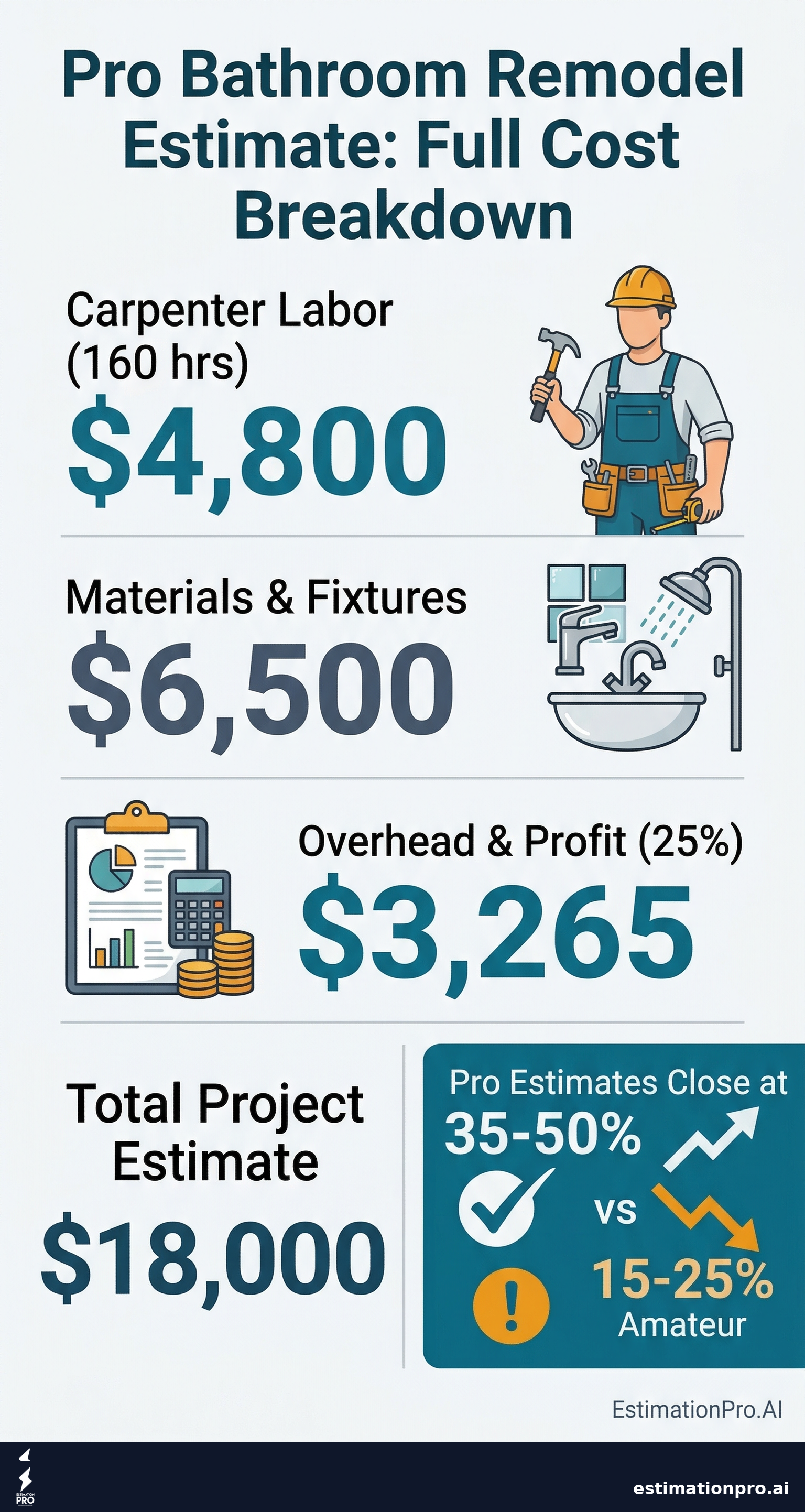
| Carpenter labor | 160 hours at $30/hr | $4,800 |
| General laborer | 80 hours at $22/hr | $1,760 |
| Materials and fixtures | Tile, vanity, plumbing, fixtures | $6,500 |
| Overhead and profit (25%) | 25% of direct costs | $3,265 |
| Building permit | Municipal fee | $1,200 |
| Dumpster rental (1 week) | 15-yard roll-off | $475 |
| Total estimate | $18,000 |
See how every number connects to something real? The homeowner can trace exactly where their money goes. That’s what separates a pro estimate from “Bathroom remodel - $18,000.”
Labor rates above come from BLS occupational wage data for carpenters ($20-$45/hr) and general laborers ($15-$35/hr). Your numbers will vary by region, crew experience, and local demand.
Speed Wins the Job
The contractor who responds first wins the job about 70% of the time. Not the cheapest. Not the most experienced. The fastest.
I learned this the hard way early in my career. I’d take two or three days to put together a thorough estimate, only to hear “we already went with someone else.” Now my estimates go out same day. Sometimes within an hour of the site visit.
That’s not about cutting corners on quality. It’s about having a system that doesn’t require you to start from scratch every single time you walk a job.
If you’re building estimates in a spreadsheet, typing out line items, formatting it into something presentable, then manually emailing it to the homeowner, you’re burning hours you don’t have. A dedicated estimating tool cuts that process down to minutes.
Mistakes That Tank Your Close Rate
Giving a verbal estimate. The homeowner will remember a different number than what you said. Always get it in writing.
Forgetting to follow up. The single biggest revenue leak for small contractors. You did the site visit. You spent time on the estimate. Then you let it die in someone’s inbox.
Using one big number. “Kitchen remodel - $47,000” tells the homeowner nothing. They can’t evaluate it. They can’t compare it to the other bids. They just see a scary number with no context.
Waiting too long to send it. Every day you wait is another day they might call someone else. Same-day turnaround isn’t a bonus anymore. It’s the minimum.
Skipping the timeline. The homeowner wants to know when you can start and when you’ll finish. No dates on the estimate? They’ll assume you’re disorganized.
How a Pro Workflow Actually Runs
The best contractors I know run a simple five-step process:
- Site visit - walk the job, take notes, photos, measurements
- Build the estimate - detailed line items, realistic pricing, no guesswork
- Send a branded proposal - professional PDF, not a text message
- Automated follow-up kicks in - day 1, day 3, day 7
- Signed proposal becomes an invoice - no re-entering data anywhere
Steps 2 through 5 should live in the same system. When your estimate, proposal, follow-up, and invoicing are all connected, nothing falls through the cracks and you never lose a job because you forgot to call back.
That’s exactly what I built EstimationPro to do. Not because I wanted to build software. Because I was tired of spending my evenings doing estimates instead of being with my family, and I knew there had to be a faster way for contractors like me to win more of the bids we were already sending.
Frequently Asked Questions
What is the best estimating software for small contractors?
The best estimating software depends on your crew size and workflow. Solo contractors and small teams need speed and simplicity over enterprise features. Look for line-item estimates, PDF proposals, and automated follow-up in one tool. Avoid platforms that take weeks of training before you can send your first estimate. Read our full guide on how to estimate construction jobs for a step-by-step breakdown of the process.
How long should it take to build a contractor estimate?
A pro estimate for a standard remodel should take 15-30 minutes with software, or as little as 5 minutes using AI-assisted tools. If you’re spending 2-3 hours per estimate in a spreadsheet, you’re leaving money on the table. That’s time you could spend on billable work or, better yet, with your family.
What should be included in a professional contractor estimate?
Every pro estimate needs itemized labor (hours and rates), materials listed separately, overhead and profit percentage, permits and fees, a project timeline with start and completion dates, payment terms, and your contractor license number. The more specific you are, the more trust you build. Use a contractor estimate template to make sure you never miss a line item.
How do I follow up on an estimate without sounding pushy?
Send a brief check-in 24 hours after delivering the estimate. Again at day 3 and day 7. Keep it simple: “Hi [name], just checking in on the bathroom estimate I sent over. Happy to answer any questions.” Automated follow-up handles this so you never forget and never sound desperate.
Should I show my markup on the estimate?
Yes. Listing overhead and profit (typically 15-35%) as a separate line item actually builds trust. Homeowners know you need to make money. Hiding it in inflated line items makes them suspicious. Being upfront about your margin is the fastest path to closing the deal.
Stop Leaving Money on the Table
Every dollar you lose to a sloppy estimate or a missed follow-up is money someone else is earning. Your skills aren’t the problem. Your system is.
Try EstimationPro free to send professional proposals in minutes, not hours. It handles the line items, the branded PDF, the automated follow-up, and the invoicing, so you stop chasing paperwork and start booking more of the work you’re already bidding on.
Regional pricing note: All costs shown reflect 2026 data from BLS and RSMeans. Prices vary by region, project scope, material selections, and local labor demand. Get quotes from local contractors to confirm pricing for your area.
Pricing a job like this?
Get every line item priced for your area in a full estimate
Describe the job or snap a few photos. Send it from EstimationPro and it follows up with your client for you.
3 free estimates in the first 7 days. No credit card.
Pro-Level Remodel Estimate Breakdown
Contractor Estimating Approaches Compared
- Lump sum number
- No line items
- No follow-up
- Handwritten or verbal
- Basic line items
- Manual formatting
- Manual follow-up
- Slow to produce
- Detailed line items
- Branded PDF proposals
- Automated follow-up
- 5-minute turnaround
- Full project management
- Accounting integration
- Weeks to learn
- Built for large GCs
Get Free Estimating Tips
Enter your email and we'll send you pro tips, cost data, and useful resources for contractors.
We'll send helpful resources and occasional tips. Unsubscribe anytime.
 EstimationPro AI For Contractors, By Contractors
 Save 2+ Hours on Every Estimate
Upload photos, record voice notes, and get AI-powered estimates with line items, material lists, and regional pricing.