

I counted 11 apps on my phone last Tuesday. Eleven. And I still had a stack of receipts stuffed in my truck console that hadn’t been logged anywhere.
If you’re an independent contractor running your own operation, you already know the problem. You’re the estimator, the project manager, the bookkeeper, the salesperson, and the one swinging the hammer. The right apps don’t add more work to your plate. They take work off it.
I’ve tested dozens of contractor apps over the past few years, and most of them are either built for enterprise crews with 50+ employees or so bare-bones they’re basically a glorified notepad. What follows is the honest list of what actually works for a one-person or small-crew operation.
Quick Answer
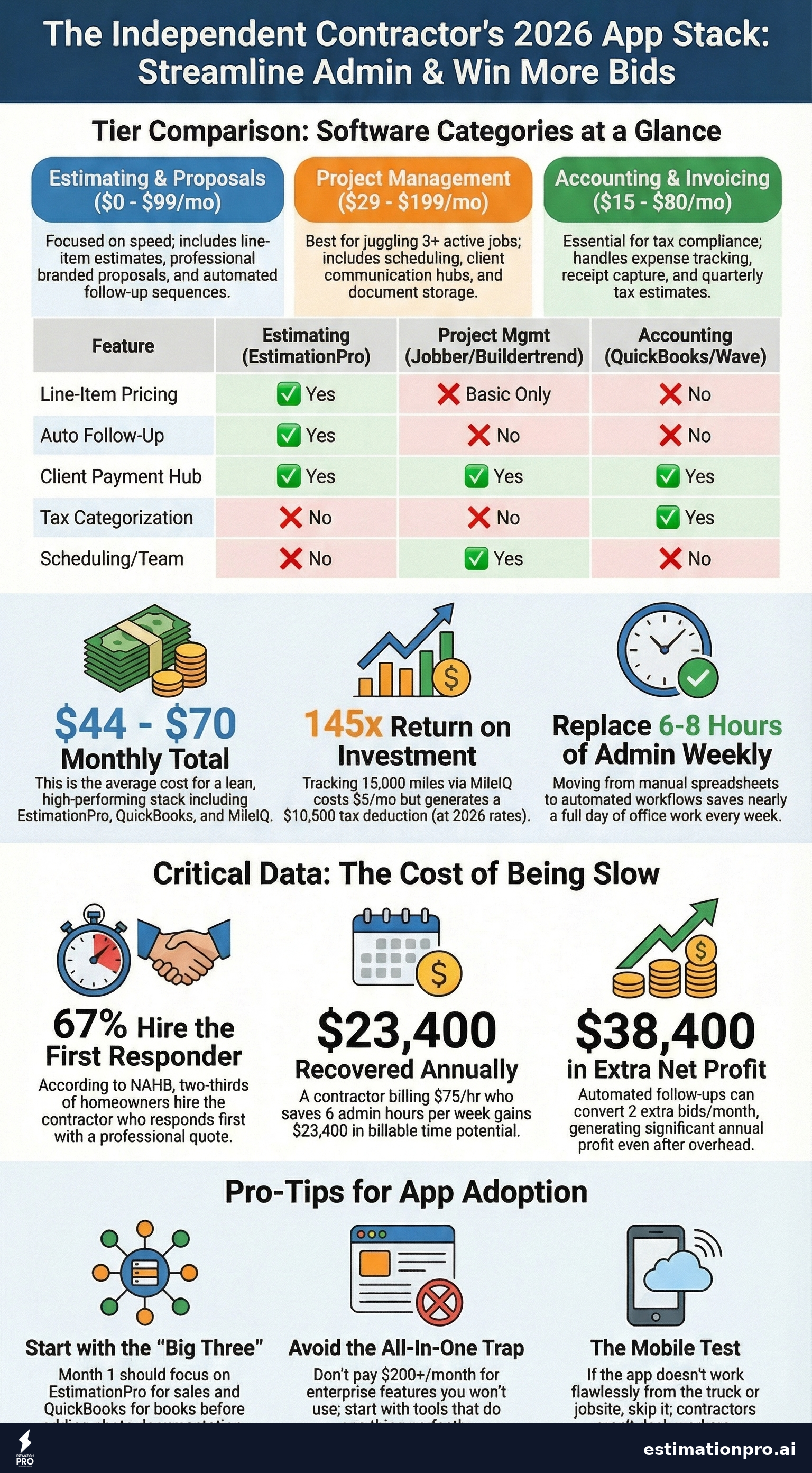
The best apps for independent contractors cover three categories: estimating and proposals (EstimationPro), project management (Buildertrend or Jobber), and accounting (QuickBooks Self-Employed or Wave). Most independent contractors need one app from each category, not an all-in-one platform that does everything poorly. Budget $50-$150/month total for software that replaces 6-8 hours of weekly admin work.
Try EstimationPro free to handle estimates, proposals, and automated follow-up from one dashboard.
Estimating and Proposal Apps
This is where most independent contractors lose the most money. Not because they bid wrong, but because they bid slow. According to a 2024 NAHB survey, 67% of homeowners hire the contractor who responds first with a professional quote. Speed kills in this business, and not the good kind if you’re the slow one.
EstimationPro
Built specifically for residential remodelers and small contractors. You feed it project details, photos, or notes, and it generates line-item estimates with regional pricing. The real differentiator is what happens after: it sends branded proposals and runs automated follow-up sequences so your bids don’t die in someone’s inbox.
What I like: The follow-up automation alone is worth it. I used to lose track of which homeowners I’d quoted and which ones needed a nudge. Now the system handles that. It also does invoicing and payment collection through Stripe, so the whole workflow is estimate, proposal, follow-up, invoice, paid. You can even start from a construction estimate template and customize from there.
Pricing: Free trial, paid plans start under $50/month.
Best for: Residential remodelers, kitchen/bath contractors, general contractors who send 5+ estimates per month.
Jobber
Jobber works well for service-based contractors: HVAC techs, plumbers, electricians, landscapers. It handles quoting, scheduling, invoicing, and client communication in one interface. The mobile app is solid for field work.
What I like: The client hub where homeowners can approve quotes and pay invoices online. Clean interface.
What I don’t: The estimating side is basic. No line-item cost databases, no material pricing. You’re building quotes manually. For simple service calls that works fine. For a $45,000 kitchen remodel, you need something purpose-built.
Pricing: Starts at $49/month for the Core plan.
Buildertrend
More of a project management platform with estimating features bolted on. Popular with builders and remodelers running multiple projects. Handles scheduling, change orders, selections, and client communication.
What I like: The selections feature where clients pick finishes and materials. Keeps everything documented and approved.
What I don’t: Overkill for a one-person operation. The learning curve is steep, and you’re paying for features you won’t use until you have a crew.
Pricing: Starts at $99/month.
Share This Infographic
Feel free to share this infographic on your website. Just copy the embed code below:
Copy this embed code:
<a href="https://estimationpro.ai/tools/blog/apps-for-independent-contractors" target="_blank" rel="noopener">
  <img src="https://estimationpro.ai/tools/blog/infographics/apps-for-independent-contractors-infographic.png" alt="apps for independent contractors infographic by EstimationPro.AI" style="max-width:100%;height:auto" loading="lazy" />
</a>
<p style="font-size:12px;color:#64748B;margin-top:8px">Source: <a href="https://estimationpro.ai/tools/blog/apps-for-independent-contractors">EstimationPro.AI</a></p>
Accounting and Invoicing Apps
The IRS doesn’t care that you were on a ladder all day. Your books still need to be right. These apps make that less painful.
QuickBooks Self-Employed
The standard for a reason. Tracks income, expenses, mileage, and separates business from personal spending. The receipt capture feature (snap a photo, it categorizes it) has saved me from that truck-console receipt pile more times than I can count.
What I like: Quarterly tax estimates. It calculates what you owe as you go, so April isn’t a nightmare. Bank feed integration pulls transactions automatically.
What I don’t: The self-employed version is limited. Once you hire employees or need job costing, you’ll outgrow it and jump to QuickBooks Online, which costs more.
Pricing: $15/month for Self-Employed. QuickBooks Online starts at $35/month.
Wave
Free accounting software. Actually free, not “free trial then surprise.” Invoicing, receipt scanning, expense tracking, and financial reports. Wave makes money on payment processing and payroll add-ons.
What I like: Hard to argue with free. The invoicing is clean and professional. Good enough for most solo contractors who just need to track money in and money out.
What I don’t: No mileage tracking. No inventory management. Customer support is limited on the free plan.
Pricing: Free for accounting and invoicing. Payment processing at 2.9% + $0.60 per transaction.
FreshBooks
Sits between Wave and QuickBooks. Time tracking, project-based billing, and solid invoicing. The interface is more user-friendly than QuickBooks, especially if accounting makes your eyes glaze over.
What I like: Time tracking tied to projects. If you bill hourly for certain work (T&M jobs, consulting), FreshBooks makes it simple. The automated payment reminders are a nice touch.
Pricing: Starts at $19/month.
What You’ll Actually Spend on Apps Per Month
Here’s a realistic monthly software budget for an independent contractor:
| App Category | Recommended | Monthly Cost |
|---|---|---|
| Estimating + Proposals | EstimationPro | $29 - $49 |
| Accounting | QuickBooks Self-Employed | $15 |
| Mileage Tracking | MileIQ or built-in | $0 - $6 |
| Cloud Storage | Google Drive | $0 |
| Communication | Google Voice | $0 |
| Total | $44 - $70/mo |
Compare that to the cost of one missed bid because you quoted too slow, or one tax penalty because your receipts were a mess. The math works out fast.
Project Management and Scheduling
Not every independent contractor needs a full project management app. If you’re running one job at a time, a calendar and a notebook might be enough. But once you’re juggling 3+ active projects with overlapping timelines, you need a system.
Google Calendar + Google Drive
Don’t laugh. For a solo contractor running 1-2 jobs, this combination handles 80% of what you need. Shared calendars for client visibility, Drive folders for project photos and documents, and it costs nothing.
I used this setup for years before the workload justified paid software. It works until it doesn’t.
Monday.com
Visual project boards that track tasks, timelines, and team assignments. Not construction-specific, but flexible enough to adapt. The Gantt chart view is useful for mapping out project phases.
Pricing: Starts at $9/seat/month. Solo users can start with the free tier.
CompanyCam
Photo documentation app built for contractors. Time-stamped, GPS-tagged photos organized by project. Before and after shots, progress photos, punch list items. If you’ve ever had a client dispute what their kitchen looked like before demo day, this app pays for itself.
Pricing: $19/user/month.
Field Tools That Save Real Time
These aren’t glamorous. They’re the apps that shave 15 minutes here, 30 minutes there, adding up to hours each week.
MileIQ - Automatic mileage tracking. Runs in the background, logs every drive, and you swipe to categorize business vs. personal. At the IRS standard rate of $0.70/mile (2026), tracking 15,000 business miles per year is a $10,500 deduction. MileIQ costs $6/month. That’s a 145x return on investment.
Google Voice - Separate business phone number that rings to your personal cell. Free. Keeps your personal number private, and the voicemail transcription is surprisingly accurate.
Measure (iOS) / AR Measure - Quick field measurements using your phone’s camera and AR. Not precise enough for a final estimate, but good enough for a ballpark when a client asks “how big is this room?” during a walkthrough. Always verify with a tape measure for actual bids.
Mistakes I See Contractors Make With Apps
Buying the all-in-one and using 10% of it. A $200/month platform is a waste if you only use the invoicing. Start with focused tools that do one thing well. Combine them later if you need to.
Not actually using what they pay for. I’ve talked to contractors who pay for QuickBooks and still track expenses in a spiral notebook. The app only works if you work it. Spend an hour setting it up right, or it’s just another subscription you forget about.
Skipping the estimating tool. This is the biggest one. Contractors will pay for accounting software, truck GPS, even drone subscriptions, but they quote jobs from memory or a spreadsheet they built in 2019. Your estimates are your revenue pipeline. A pricing mistake on a $30,000 bathroom remodel costs more than a year of software subscriptions. If you’re still using spreadsheets, read our breakdown of contractor estimating spreadsheet vs software to see what you’re missing.
Ignoring follow-up. According to BLS data on small business failure rates, cash flow problems kill more contractors than bad workmanship. A huge piece of cash flow is converting bids to booked work. If you send 20 estimates a month and follow up on zero of them, you’re leaving money on the table. Automated follow-up fixes this without adding a single task to your day.
How to Pick the Right Stack
Start with these three questions:
-
Where am I losing the most time? If it’s estimating, fix that first. If it’s chasing invoices, fix that. Don’t buy five apps at once.
-
What’s my crew size? Solo operators need different tools than a 10-person company. Per-seat pricing on project management apps gets expensive fast.
-
Does it work on my phone? If the app doesn’t have a solid mobile experience, skip it. You’re not sitting at a desk all day. The app needs to work from the truck, the jobsite, and the supply house.
Build your app stack over time. My recommendation for a brand-new independent contractor:
- Month 1: EstimationPro (estimates + proposals + follow-up) and QuickBooks Self-Employed (books)
- Month 3: Add CompanyCam or Google Drive for photo documentation
- Month 6: Add project management if you’re consistently running 3+ jobs
That’s it. You don’t need 11 apps on your phone. You need 3-4 that you actually use every day.
How This Connects to Your Bottom Line
A contractor billing $75/hour who saves 6 hours per week on admin work recovers $23,400 per year. That’s not a projection. That’s basic arithmetic. The apps listed above cost under $100/month combined. The return is 20x.
But the bigger number comes from winning more work. If automated follow-up converts even 2 extra bids per month at an average job value of $8,000, that’s $192,000 in additional annual revenue. Not all of that is profit, obviously. But even at a 20% net margin (which aligns with the 15-35% overhead and profit range reported by NAHB), that’s $38,400 in extra profit from a feature that runs automatically. Use our contractor markup calculator to see exactly where your margins land, and our contractor overhead calculator to make sure your hourly rate actually covers your costs.
The tools you use aren’t an expense. They’re the difference between running a business and just doing jobs.
FAQ
What is the best free app for independent contractors?
Wave is the best free option for accounting and invoicing. For estimating, EstimationPro offers a free trial so you can test the full workflow before committing. Google’s suite (Calendar, Drive, Voice) covers communication and organization at zero cost.
Do I need separate apps for estimating and invoicing?
Not necessarily. EstimationPro handles the full pipeline from estimate to proposal to invoice to payment. But many contractors prefer specialized accounting software like QuickBooks for tax prep and expense tracking, since that’s a different job than building estimates.
How much should an independent contractor spend on software per month?
Budget $50-$100/month to start. That covers estimating, accounting, and basic communication tools. Scale up only when you’ve outgrown what you have. The goal is 20x return on every software dollar, which means the tools should save you time or win you jobs worth far more than the subscription.
What apps do contractors use for scheduling?
For solo operators, Google Calendar is often enough. For crews or multi-project operations, Jobber and Buildertrend both offer solid scheduling with client notifications. The key feature to look for is two-way calendar sync so your personal and work schedules don’t collide.
Should I use an all-in-one contractor app or separate tools?
Separate tools that each do one thing well typically outperform all-in-one platforms for independent contractors. The all-in-one approach makes more sense once you have a team of 5+ and need everyone on the same system. Start focused, expand as needed.
Prices and features referenced reflect publicly listed information as of April 2026. Software pricing changes frequently. Always verify current pricing on the vendor’s website. Sources: NAHB builder surveys, BLS small business data, vendor pricing pages.
Contractors on Capterra rate EstimationPro 4.8/5 for reducing admin time and winning more bids. Try EstimationPro free - it builds the estimate, sends the proposal, follows up with the homeowner automatically, and collects payment when the job is done. That’s the full cycle handled while you’re on the jobsite actually doing the work.
Pricing a job like this?
Get every line item priced for your area in a full estimate
Describe the job or snap a few photos. Send it from EstimationPro and it follows up with your client for you.
3 free estimates in the first 7 days. No credit card.
Contractor App Categories at a Glance
- Line-item estimates
- Professional proposals
- Automated follow-up
- Material cost databases
- Scheduling and timelines
- Client communication
- Document storage
- Team task tracking
- Invoice generation
- Expense tracking
- Tax categorization
- Payment processing
Get Free Estimating Tips
Enter your email and we'll send you pro tips, cost data, and useful resources for contractors.
We'll send helpful resources and occasional tips. Unsubscribe anytime.
 EstimationPro AI For Contractors, By Contractors
 Professional Estimates That Follow Up for You
Priced line items, a clean PDF or client link, and automatic follow-up once you send it.