
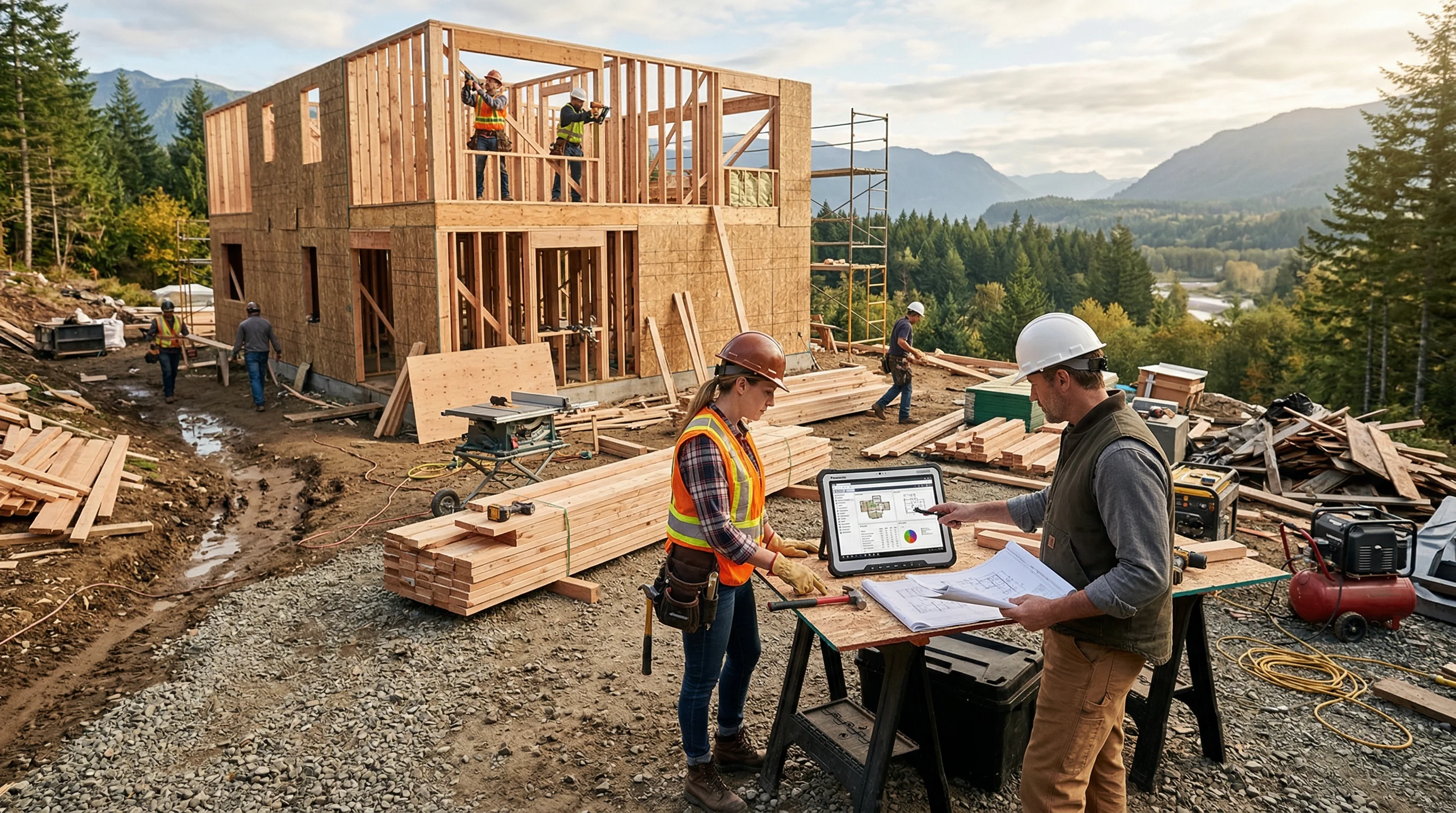
I’ve lost count of how many evenings I spent at the kitchen table, typing line items into a spreadsheet at 10 PM for a bathroom bid. Three hours per estimate. Maybe half of them turned into actual jobs. The math never made sense, but that was the reality until AI tools started showing up in the estimating space.
Things have shifted fast. AI construction estimating software can pull quantities from photos, convert voice notes into line items, and generate professional proposals before the homeowner calls your competitor. Not all of these tools deliver on their promises, though. I’ve tested several of them and talked to contractors who use them daily.
Here’s what I found.
Quick Answer: Which AI Estimating Software Should You Use?
For residential remodelers and small contractors, EstimationPro.AI offers the best combination of AI-powered estimating, automated proposals, and follow-up sequences at a price that makes sense. For commercial estimating with plan takeoffs, Togal.AI and STACK lead the field. Budget-conscious contractors should start with free tiers before committing.
- No single tool is “best” for everyone. A framing contractor and a full-service remodeler have very different needs.
- Pricing ranges from $0 to $500+/month depending on the platform
- Photo-based AI and plan-based AI solve fundamentally different problems
- The real value isn’t just faster estimates. It’s what happens after the bid goes out.
Try EstimationPro free to see how AI handles your next estimate from photos and notes.
AI Estimating Software vs AI Bidding Software
These two get used like they mean the same thing. They don’t.
Estimating is the math. Quantities, labor hours, material costs, and what your number is. Bidding is everything wrapped around that number: the proposal document, how it’s presented, the follow-up call, the revision after the homeowner asks about upgrading the tile.
AI bidding software for construction usually bundles the estimate together with proposal generation and follow-up. AI estimating software may stop at the number and hand it back to you. If you already have a proposal process you like, buy the estimating piece. If you’re losing jobs because the paperwork took four days to go out, the bidding side is what you actually need.
I lost a bathroom job for exactly that reason. My number was fair and the homeowner liked me. Another contractor sent a clean proposal that same afternoon, and that was the entire difference between us.
How We Evaluated These Tools
We focused on five things that matter to working contractors:
- AI accuracy - Does it produce numbers you’d actually stand behind on a bid?
- Speed - How fast from input to finished estimate?
- Learning curve - Can you figure it out without an IT department?
- Integration - Does it connect to your existing workflow (proposals, invoicing, follow-up)?
- Price - What does it actually cost after the trial ends?
We skipped tools that slap “AI” on their marketing page but don’t use machine learning in the estimating process. That eliminated more options than you’d expect.
Side-by-Side: 9 AI Estimating Tools Compared
| Tool | Best For | AI Input | Starting Price | Free Tier | Mobile |
|---|---|---|---|---|---|
| EstimationPro.AI | Residential remodelers | Photos, voice, notes | Free (plans from $79/mo) | Yes | Yes |
| Togal.AI | Commercial plan takeoffs | Blueprint auto-measure | ~$300/mo | No | No |
| STACK | Cloud-based takeoffs | AI-assisted measurements | $1,899/yr | Limited | Yes |
| Buildxact | Residential builders | Plan-based material lists | ~$149/mo | 14-day trial | Yes |
| ProEst | Large commercial teams | AI cost database | Custom ($500+/mo est.) | Demo only | Yes |
| Kreo | 2D plan takeoffs | AI quantity extraction | Custom pricing | Demo only | No |
| Beam | General contractors | AI-generated estimates | ~$99/mo | Limited | Yes |
| Handoff AI | All-in-one for remodelers | Voice-to-estimate | ~$149/mo | No | Yes |
| Procore | Large commercial GCs | AI on a full PM platform | $375+/mo per user | No | Yes |
Pricing from vendor websites and demos, verified February 2026. Prices may vary by region and plan.
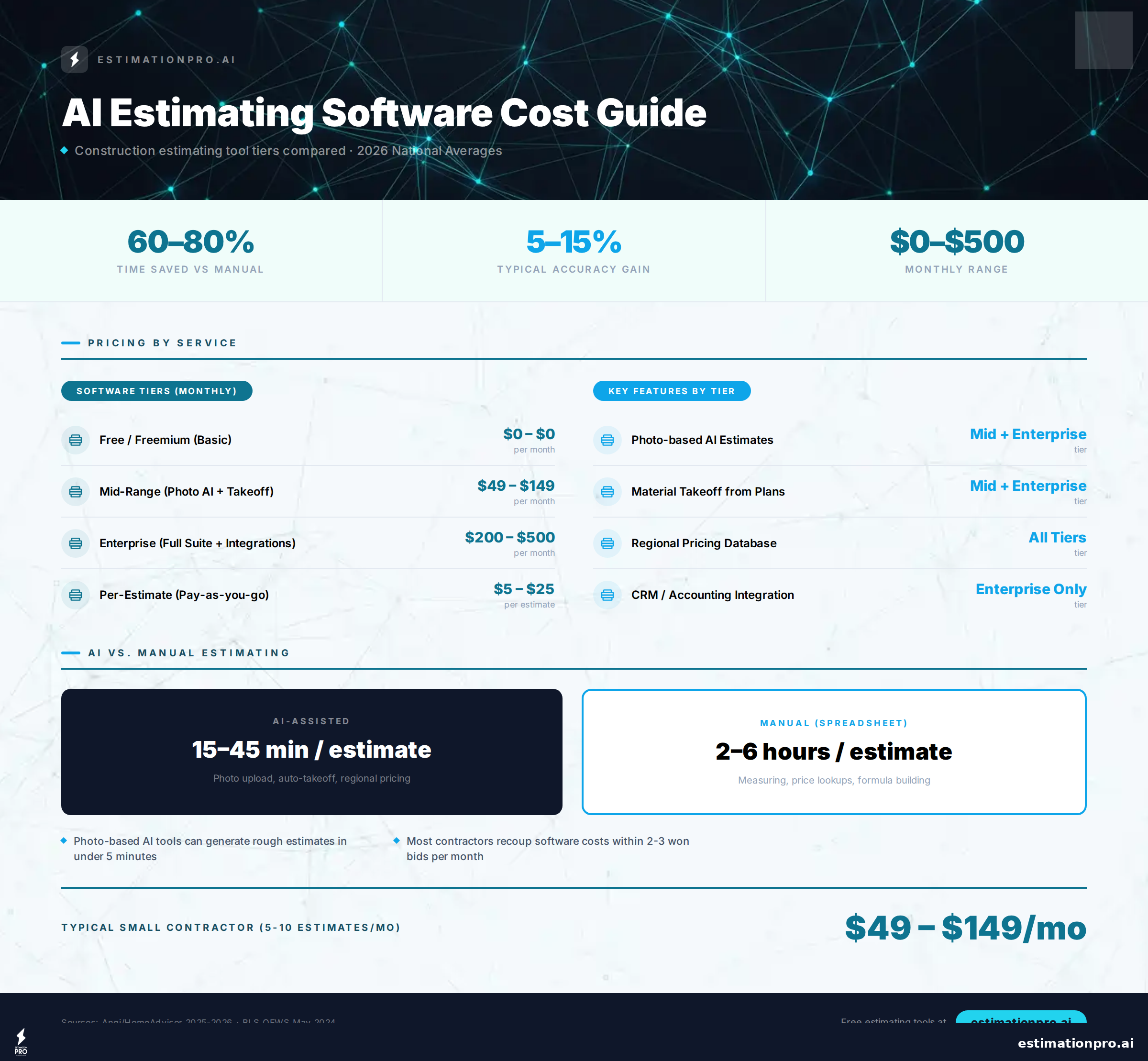
Share This Infographic
Feel free to share this infographic on your website. Just copy the embed code below:
Copy this embed code:
<a href="https://estimationpro.ai/tools/blog/best-ai-construction-estimating-software" target="_blank" rel="noopener">
  <img src="https://estimationpro.ai/tools/blog/infographics/best-ai-construction-estimating-software-infographic.png" alt="Best AI construction estimating software infographic by EstimationPro.AI" style="max-width:100%;height:auto" loading="lazy" />
</a>
<p style="font-size:12px;color:#64748B;margin-top:8px">Source: <a href="https://estimationpro.ai/tools/blog/best-ai-construction-estimating-software">EstimationPro.AI</a></p>
How AI Construction Estimating Actually Works
Every vendor describes this differently, so here’s the plain version. Three steps, and the middle one is where tools separate themselves.
1. You hand it the project. Photos of the space, a voice memo from the walkthrough, or a set of plans. Photo and voice input is what makes AI estimating usable from a truck. Plan-based takeoff needs a desk and a real file.
2. It matches your scope against pricing data. This is the step that decides whether the tool is any good. The AI reads the scope, breaks it into line items, and prices each one against a cost database or against your own historical numbers. A tool that prices off your past jobs beats a tool using national averages every single time, because your labor rate is not the national average and your suppliers are not the national average either.
3. You review and send. Nothing goes out unreviewed. I check quantities first, then whatever the AI couldn’t see, then the total against my gut. On a bathroom that review runs about fifteen minutes.
The time saving is real, but notice where it comes from. Steps one and three collapse. You’re not building an estimate anymore. You’re checking one.
AI Takeoff Software Is a Different Product
Takeoff and estimating get sold together, so it’s worth separating them. Takeoff is measurement: how many squares of roof, how many linear feet of baseboard, how many sheets of drywall. Estimating is what those quantities cost once you add labor, waste, overhead, and profit.
AI takeoff software reads a plan set and pulls the quantities off it automatically. Togal, Kreo, and STACK all do a version of this. You upload the PDF, it identifies rooms and assemblies, and it produces a measured quantity list in minutes instead of the hour or two it takes to click through a plan by hand.
What it gets right: repetitive counting on clean, well-drafted plans. Doors, windows, fixtures, floor areas. That work is tedious and error-prone when a human does it at the end of a long day, and the software does not get tired.
What it still gets wrong: anything the drawing doesn’t say. Hand-marked revisions, scanned sheets that came through crooked, assemblies drawn in a way the model hasn’t seen. It also can’t tell you that the plan is wrong, which happens more than architects like to admit.
Here’s the part that decides whether you need it at all. If you bid from plan sets, AI takeoff saves you real hours. If you’re a remodeler who bids from a walkthrough and a tape measure, you have no plans to feed it, and a photo-and-voice tool fits your day far better. I’ve bid plenty of kitchens where no drawing existed at any point.
Individual Tool Breakdowns
EstimationPro.AI - Best for Residential Remodelers
Full disclosure: I built this one. But here’s why it belongs in this comparison. Most AI estimating tools were designed by software engineers who have never priced a bathroom gut-and-rebuild. EstimationPro was designed by someone who has.
How it works: Snap photos of the space, add voice notes or typed notes about the scope, and the AI generates a detailed line-item estimate. Not a ballpark range. Actual line items with quantities and pricing for your region.
What sets it apart: The full workflow. Estimate to proposal to automated follow-up sequences to invoicing and payment. Most tools stop at the estimate. EstimationPro keeps working after the bid goes out, sending follow-ups at day 1, day 3, and day 7 so leads don’t ghost.
Pricing: Free tier available. Paid plans start at $79/month.
Best fit: Solo remodelers and small crews who need speed without sacrificing detail.
For a deeper walkthrough, check out our guide on how to use AI for construction estimates.
Togal.AI - Best for Commercial Plan Takeoffs
Togal focuses on one thing: AI-powered measurement from blueprints. Upload a set of plans and it auto-detects rooms, walls, and areas. The technology is impressive for commercial estimating teams processing large plan sets.
Strengths: Fast, accurate measurements from 2D plans. Integrates with major estimating platforms.
Weaknesses: No field estimating. No photo input. Not designed for residential work. Steep price point for small shops.
Pricing: Around $300/month per user.
Best fit: Commercial GCs and estimating departments handling large volumes of plans.
STACK Construction Technologies - Best Cloud-Based Takeoffs
STACK has been a strong takeoff platform for years and recently added AI-assisted features. Their strength is plan-based takeoffs, and the AI helps speed up repetitive measurements.
Strengths: Mature platform. Solid integration options. Team collaboration features.
Weaknesses: AI features feel added on rather than built into the core. Expensive for one-person operations.
Pricing: $1,899/year (roughly $158/month).
Best fit: Mid-size firms that need plan-based takeoffs with team access.
Buildxact - Best for Residential Builders
Buildxact targets residential builders specifically. Their tools handle estimating from plans, scheduling, and purchase orders. The AI helps generate material lists from uploaded drawings.
Strengths: Residential-focused. Material list generation saves time. Good scheduling features.
Weaknesses: Weaker on remodeling workflows. AI is plan-dependent, not photo-based.
Pricing: Approximately $149/month.
Best fit: New home builders who work primarily from architectural plans.
ProEst - Best for Large Commercial Teams
ProEst is a heavy-duty estimating platform with an extensive cost database and AI-assisted features. Built for commercial estimating teams, not one-person shops.
Strengths: Deep cost database. Extensive reporting. Enterprise integrations.
Weaknesses: Expensive. Complex setup. Massive overkill for residential contractors.
Pricing: Custom, estimated $500+/month.
Best fit: Commercial general contractors with dedicated estimating staff.
Kreo - Best for 2D Plan AI Extraction
Kreo uses AI to extract quantities from 2D architectural plans. It automates the counting and measuring that estimators typically do by hand.
Strengths: Accurate quantity extraction. Cuts manual takeoff time significantly.
Weaknesses: Limited to plan-based work. Desktop-focused. Smaller user community.
Best fit: Estimators processing high volumes of 2D plans regularly.
Beam - Best Budget AI Option
Beam offers AI-generated estimates at a lower price point. It’s newer to the market but gaining traction with contractors who want AI without a large monthly bill.
Strengths: Affordable. Quick setup. Decent accuracy for common project types.
Weaknesses: Smaller cost database. Fewer integrations. Still maturing as a product.
Pricing: Around $99/month with a limited free tier.
Best fit: Contractors testing AI estimating for the first time.
Free AI Construction Estimating: What $0 Actually Gets You
Free splits into three approaches and they are not equivalent.
A general AI chatbot plus your own spreadsheet. Costs nothing. You describe the job, it spits out line items, you paste them into your template and price them yourself. It has no idea what lumber costs in your county, so every number needs replacing. Handy for not forgetting a scope item. Worthless for pricing.
A free tier on a paid platform. Usually caps how many estimates you can send per month. It’s a reasonable way to find out whether the workflow fits your week before any money changes hands.
A free plan built for contractors. EstimationPro has one. Real AI estimates from photos and notes, with limits on volume rather than crippled features.
Here’s the honest tradeoff. Free tools save you typing. Paid tools save you the evening. If you send two estimates a month, stay free and don’t feel bad about it. If you send fifteen, the math flips quickly, and you can settle it yourself: price an hour of your own time in the labor cost calculator and compare that against the subscription.
Estimating From Your Phone on the Jobsite
Most contractors want an AI construction estimating app, not desktop software. That narrows the field fast.
Photo and voice tools work on a phone because the input is a photo and your voice. Plan-takeoff tools don’t, because nobody is marking up a blueprint on a five inch screen. Of the seven above, EstimationPro, Beam, Buildxact, and STACK are genuinely usable in the field. Togal and Kreo are office tools, and that’s fine as long as you know it before you pay.
The workflow that actually holds up: walk the job with the homeowner, photograph every surface you’re going to touch, talk the scope out loud while it records, and have a draft waiting before you’re back in the truck.
Worked Example: Kitchen Remodel Bid
Mid-range kitchen, Pacific Northwest, house built in the 1970s. Cabinets, counters, flooring, paint, light electrical.
The old way took me three hours. Measure off photos, look up cabinet pricing, build the line items, write the proposal, send it two days later and hope.
With AI in the loop, I photographed the kitchen during the walkthrough and recorded the scope while the homeowner talked through what she wanted. The draft came back with cabinets, counters, flooring, demo, disposal, and paint already itemized. I corrected two quantities, added contingency for the subfloor because the house was from the 70s and I have been burned there before, and sent it that evening.
A mid-range PNW kitchen usually starts around $45K. That number shocks people. Software doesn’t make it cheaper. It means I’m not spending my evening proving it. Run your own before you quote one with the kitchen remodel cost calculator.
Handoff AI - Best All-in-One for Remodelers
Voice-to-estimate with a full platform behind it: CRM, proposals, invoicing. Around $149/month, no free tier. If you want one subscription instead of three and you’re willing to move your client records into it, this is the closest competitor to what I’d recommend for a residential shop. The catch is the same as any all-in-one: you’re betting your CRM on the same vendor as your estimating, and switching later means moving everything at once. I keep a full EstimationPro vs Handoff comparison with their current plan prices, credit limits and commitments, checked against their pricing page.
Procore - Best for Large Commercial GCs
AI estimating bolted onto an enterprise project management platform. Starts around $375/month per user, which tells you exactly who it’s for. If you’re running a commercial GC with a dedicated estimating team and you already live in Procore, the estimating module is worth turning on. If you’re a three-person remodeling crew, this is not your tool and the per-seat pricing will tell you so.
Who AI Estimating Software Is Not Right For
Credibility runs both directions, so here’s where I’d tell you to skip it.
Complex custom builds with heavy unknowns. AI can’t see the dry rot behind the tile, the knob-and-tube in the wall, or the non-standard framing the last contractor left you. On high-unknown jobs, experienced judgment sets the floor and the software is along for the ride.
Highly specialized regional pricing. Rural markets, extreme climates, and specialized trades like historic restoration or seismic retrofitting have cost structures these models have not seen much of. Verify against your own historical numbers before you trust a total.
Full CSI division commercial takeoffs. Most of the residential-focused tools here do not go that deep. That’s what ProEst, Procore, and Togal exist for.
If you’re in the first group, the honest answer is that no tool on this page fixes your estimating. Tracking your own production rates does.
Three Mistakes Contractors Make When Choosing AI Estimating Tools
I talk to contractors every week who are either skeptical of AI estimating or disappointed by it. Same three problems come up again and again.
1. Judging the tool on estimate number one. AI estimating learns from your corrections. The first few estimates might need adjustments. By the tenth job, the AI knows your pricing patterns and regional rates. Give it 10 projects before you make a verdict.
2. Mixing up photo-based and plan-based tools. These solve different problems entirely. Photo-based AI (like EstimationPro) is built for field work. Walk in, snap photos, walk out with an estimate. Plan-based AI (like Togal or Kreo) is built for office work with architectural drawings. Picking the wrong type means the tool won’t fit how you actually work.
3. Ignoring what happens after the estimate. An estimate sitting in a PDF on your desktop doesn’t win jobs. The contractor who sends a professional proposal 20 minutes after the site visit and follows up automatically wins more work than the contractor with a slightly better price who takes three days. According to the National Association of Home Builders, contractors who respond within 24 hours close significantly more residential projects than slower responders (NAHB Builder Practices Survey, 2024).
If you’re weighing the switch from spreadsheets, read our breakdown of spreadsheets vs. estimating software.
AI Estimating vs. Manual Estimating: The Real Numbers
| Factor | Manual (Spreadsheets) | AI-Powered Software |
|---|---|---|
| Time per estimate | 2-4 hours | 15-45 minutes |
| Missed line items | Common (5-15% of scope) | Rare (AI cross-checks against database) |
| Follow-up after bid | Manual or forgotten | Automated sequences |
| Professional proposal | DIY formatting in Word | Auto-generated, branded |
| Monthly cost | $0 (but your time costs $50-$150/hr) | $0-$300/mo |
Based on field experience and contractor interviews, 2025-2026.
What an AI Estimator Cannot Judge
An AI estimator prices scope. It does not price the job. Those are two different things and the gap between them is where contractors get hurt.
Bidding a job isn’t just materials and labor. It’s the age of the house. It’s whether this client is going to be easy or difficult to work with. It’s whether you’re swamped right now or scraping for work, because honestly those two situations should not produce the same number. It’s how much experience you have with this specific kind of project. No tool sees any of that.
The expensive one is hidden work. I’ve opened walls in older homes and found rot, wiring that predates code, and plumbing nobody should have signed off on. None of that shows up in a photo. An experienced contractor carries contingency in the bid for exactly this reason, and the software will not add it for you.
So let it handle the line items and the arithmetic. Keep the judgment yourself. Good, fast, or cheap, pick two, and no software has ever changed that.
My Recommendation Based on How You Work
If you’re a residential remodeler or small contractor: Start with a tool that matches how you actually operate. You’re not sitting at a desk with blueprints spread out. You’re standing in a kitchen, eyeballing the demo scope, taking notes on your phone. Pick a tool that works from the field, not the office.
If you handle commercial work with full plan sets: The plan-based AI tools (Togal, STACK, Kreo) will save your estimating team real hours on every project.
If you’re not sure yet: Try a free tier. EstimationPro and Beam both offer no-cost entry points. You lose nothing by testing, and you might find that AI catches line items you’ve been missing for years.
The contractors adopting AI estimating now are building a speed advantage that compounds with every bid. Every fast, accurate quote you send is one your competitor didn’t.
Use our construction cost estimator to get accurate pricing for your next project right now.
Frequently Asked Questions
Is AI construction estimating accurate enough to send to clients?
Yes, with review. The best tools hit 85-95% accuracy on common residential projects according to vendor-reported data and contractor feedback. You’ll still want to verify quantities and adjust for site-specific conditions like access issues, material availability, or hidden damage behind walls. The AI handles the math so you spend 15 minutes reviewing instead of 3 hours building from scratch.
How much does AI estimating software cost?
Anywhere from free to $500+ per month. Budget options like EstimationPro offer free tiers for solo contractors. Mid-range tools run $100-$200/month. Enterprise platforms like ProEst charge custom rates, often $500/month or more per seat. Most tools offer trials, so test before you commit.
Will AI replace construction estimators?
No. AI handles the repetitive work: measuring, counting, pricing standard items. Human judgment is still required for unusual conditions, client-specific requirements, and the intangibles that come from 20 years of experience opening walls and finding surprises. The Bureau of Labor Statistics projects 4% growth for construction estimator jobs through 2032, even as AI adoption increases (BLS Occupational Outlook Handbook, 2024 edition).
Can I use AI estimating from my phone on a job site?
Depends on the tool. EstimationPro and Beam support mobile use from the field. Togal, Kreo, and ProEst are desktop-first tools designed for office use with plan files. If you estimate on-site after walkthroughs, mobile support should be requirement number one.
How long does it take to learn AI estimating software?
Most contractors are productive within a few hours. Photo and voice input tools have the shortest learning curve. Plan-based AI tools take longer because the takeoff workflow has more steps. Budget a few hours for photo-based tools and 1-2 days for plan-based platforms.
Prices and features verified February 2026, reviewed July 2026. AI estimating tools change quickly, so check vendor websites for current plans and capabilities. Regional labor and material costs vary, and the cost data in most of these platforms is weighted toward US pricing. Contractors in the UK, Canada, and Australia should expect to correct material rates and check whether the tool understands local measurement conventions before trusting a total. Always verify an AI-generated estimate against your own local pricing before it goes to a client.
Ready to stop spending evenings on spreadsheets? EstimationPro doesn’t just build the estimate from your photos and notes. It sends the proposal automatically and follows up with the homeowner so you win more of the bids you already send. Try EstimationPro free and get back to your family instead of your laptop.
Pricing a job like this?
Get every line item priced for your area in a full estimate
Describe the job or snap a few photos. Send it from EstimationPro and it follows up with your client for you.
3 free estimates in the first 7 days. No credit card.
AI Estimating Software by Price Tier
- Basic AI-assisted estimates
- Photo and voice input (select tools)
- Limited integrations
- Good for solo operators
- Full AI takeoffs or photo estimates
- Proposals and follow-up automation
- Client management built in
- Best for small-to-mid contractors
- Team-based AI takeoffs from plans
- Multi-project management
- Advanced reporting and analytics
- Built for GCs and commercial firms
Get Free Estimating Tips
Enter your email and we'll send you pro tips, cost data, and useful resources for contractors.
We'll send helpful resources and occasional tips. Unsubscribe anytime.
 EstimationPro AI For Contractors, By Contractors
 Save 2+ Hours on Every Estimate
Upload photos, record voice notes, and get AI-powered estimates with line items, material lists, and regional pricing.